Comparison
Figma Weave (Weavy AI) vs Martini — Node-Based AI Canvas Compared (2026)
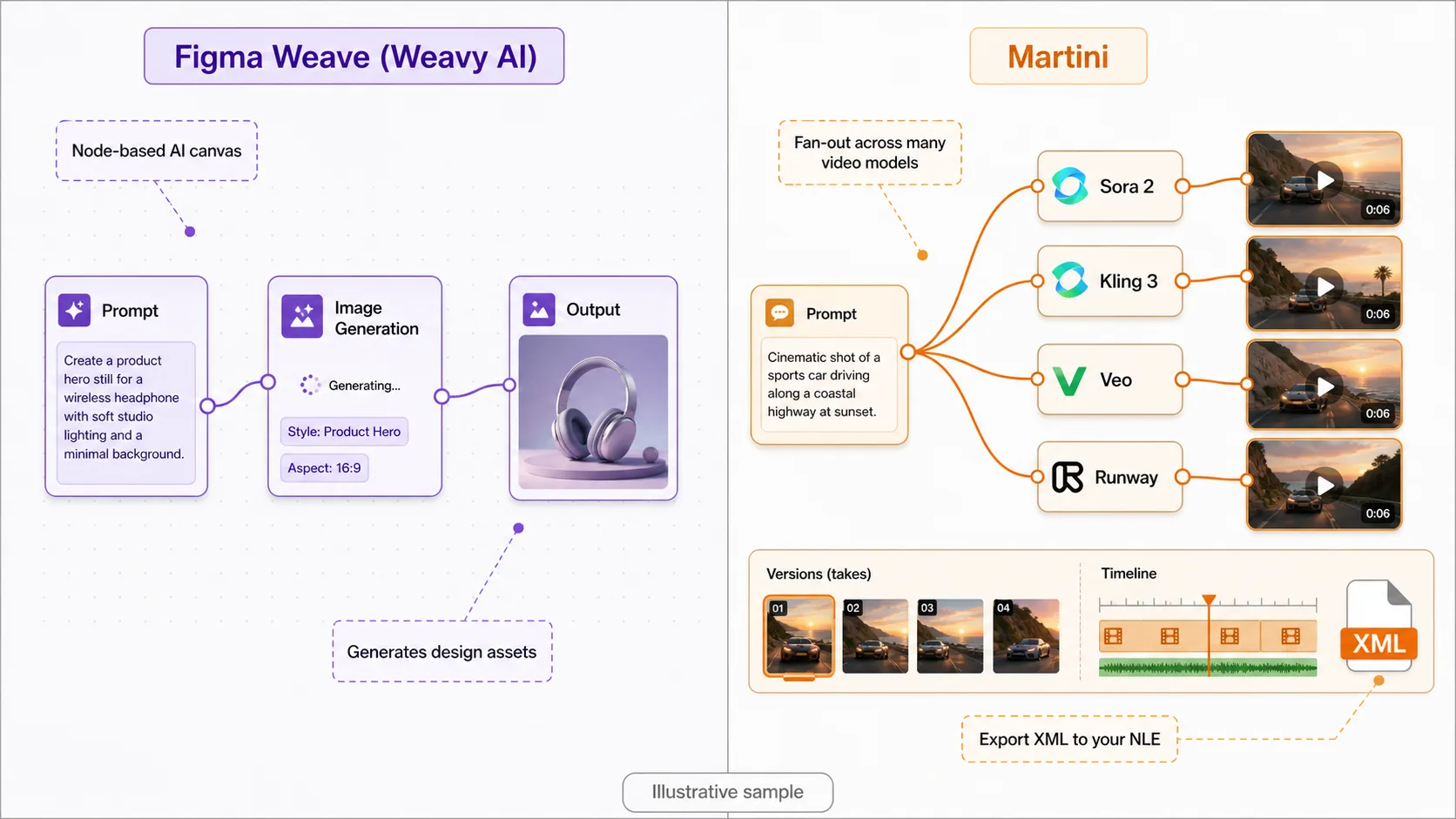
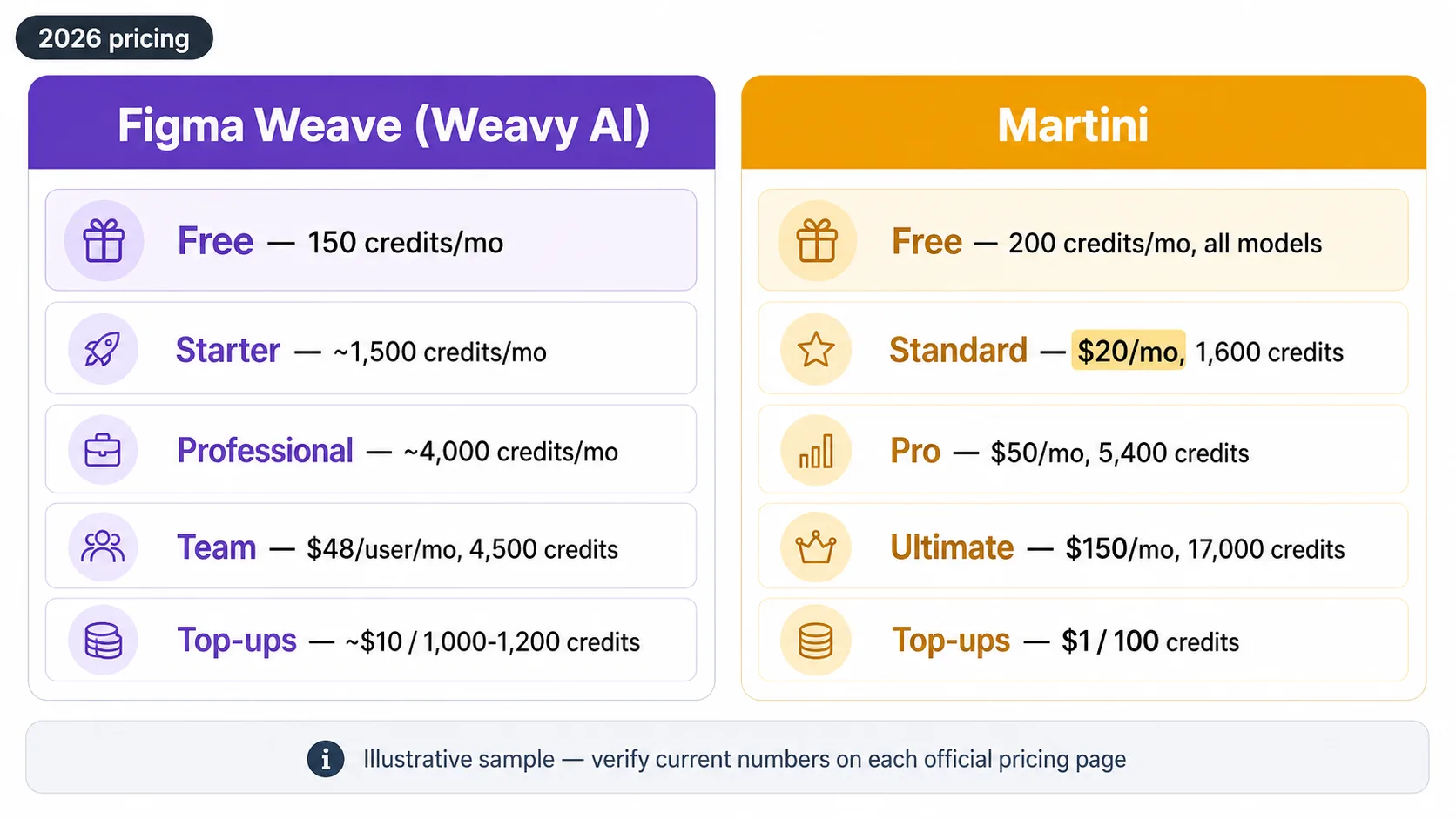
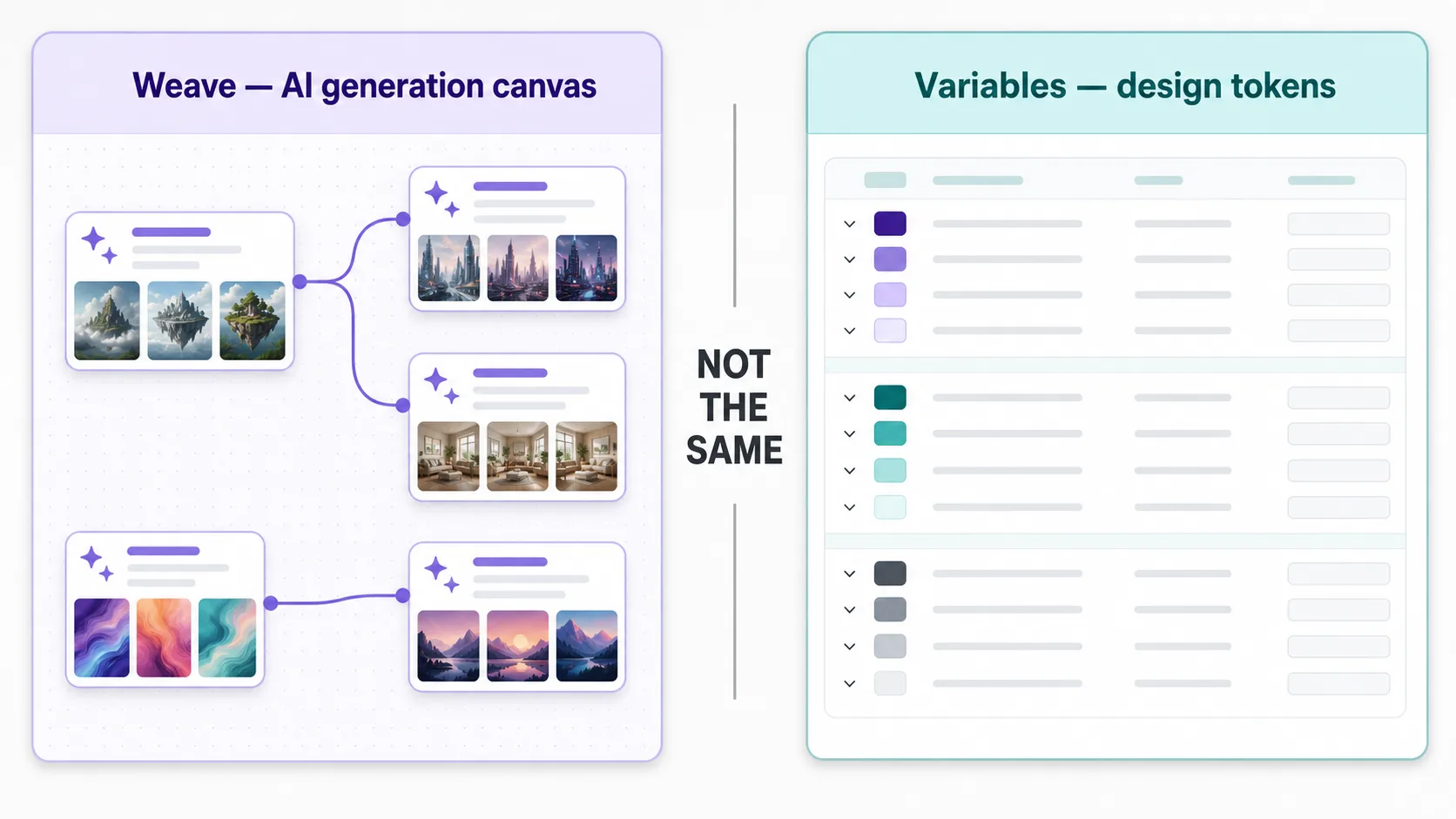
Figma Weave is the node-based AI generation canvas that came out of Weavy AI, the design-first canvas Figma acquired for a reported ~$200M in October 2025; it still bills standalone on a credit system (free at 150 credits/month, up to a Team plan at $48 per user per month with 4,500 credits, plus top-ups around $10 per 1,000–1,200 extra credits). Martini is the same node-based, chain-AI-models-on-a-canvas paradigm but built for video-first multi-model production: 50+ frontier image and video models you can fan one prompt out to simultaneously (Sora 2, Veo 3.1, Kling 3, Runway Gen-4, Seedance 2), lip-sync, voiceover, and NLE-style XML export to Premiere, DaVinci Resolve, and Final Cut Pro. Note that Figma Weave is not the same thing as Figma Variables — Variables is Figma's design-token feature, while Weave is a separate AI canvas. Pick Figma Weave to generate design assets inside the Figma ecosystem; pick Martini to fan out across frontier video models and ship a finished, editor-ready cut.
See them side by side


When to choose Martini
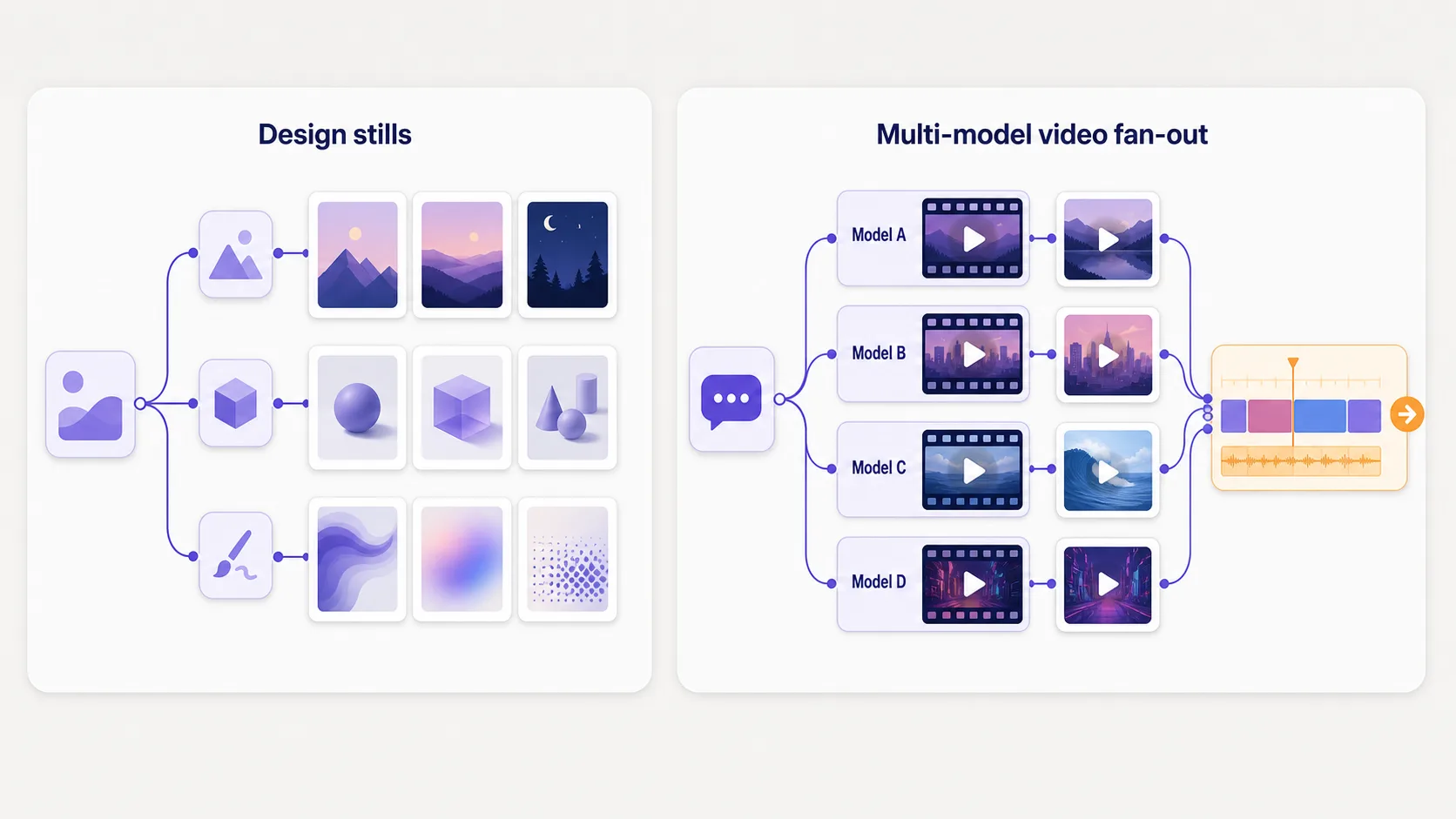
- You want to fan one prompt or source image out across many frontier video models at once — Sora 2, Veo 3.1, Kling 3, Runway Gen-4, Seedance 2, Hailuo, Vidu — and keep every take in a version tray, instead of running a curated handful one at a time.
- Your deliverable is a finished video cut, so you need image-to-video, lip-sync, and voiceover on the same canvas as the stills, then XML/EDL export so the multi-shot project opens directly in Premiere Pro, DaVinci Resolve, or Final Cut Pro.
- You need the broadest model coverage — 50+ models across image, video, audio, 3D, and tools in one canvas — rather than Figma Weave's design-asset-oriented model set.
- You run a production team and want a multiplayer canvas with workspace billing, dual-balance credits, and per-member credit limits — not collaboration routed through a design tool.
- You want a transparent free tier (200 credits/month, every model unlocked, no card) and flat usage-based paid plans rather than per-seat design-suite pricing.
When to choose Figma Weave (Weavy AI)
- You live inside the Figma ecosystem and want AI generation that sits next to your design files, components, and team — Figma Weave's biggest advantage is the Figma relationship.
- Your job is generating design assets — hero imagery, concept boards, illustration, marketing stills — rather than producing multi-shot video for an editor.
- You are a design team that values per-seat subscription predictability and a polished, design-director-friendly canvas over usage-based credit math.
- You want hands-on creative editing (lighting, masking, color grading) and branch-and-remix iteration as the core canvas surface.
- You prefer a deliberately curated model surface over a deep node library of frontier video models.
Side-by-side comparison
| Attribute | Martini | Figma Weave (Weavy AI) |
|---|---|---|
| What it is | Browser-based node canvas built for video-first AI production — fan out one prompt across many models, then export an editor-ready cut. | Node-based AI generation canvas (formerly Weavy AI), design-first, acquired by Figma in October 2025 for a reported ~$200M. |
| Canvas paradigm | Node graph where blocks chain into a workflow that produces a deliverable; signature move is fan-out across many models in parallel. | Node-based AI canvas with hands-on editing, branching, and remix — same "chain models on a canvas" idea, tuned for design output. |
| Multi-model fan-out | Wire one prompt or source image into multiple model nodes and run 50+ image and video models simultaneously, keeping every take in a version tray. | Curated model selection; runs are generally one model at a time rather than parallel fan-out across frontier video models. |
| Video model coverage | Sora 2, Veo 3.1, Kling 3 / Kling O3, Runway Gen-4, Seedance 2, Hailuo, Vidu — all callable and chainable from canvas nodes. | Video generation available (e.g., Sora, Veo) but oriented to design output, not multi-model video production. |
| Audio, lip-sync, voiceover | ElevenLabs voiceover, music, and lip-sync nodes on the same canvas as image and video. | Audio is not the core of the canvas; teams typically step out to other tools. |
| NLE / timeline export | XML and EDL export with timing intact — opens directly in Premiere Pro, DaVinci Resolve, Final Cut Pro. | Asset download (images and video files); no timeline-export step to an NLE today. |
| Figma ecosystem fit | Standalone product; no Figma integration (exports go to NLEs, not design files). | Owned by Figma since Oct 2025; the design-team and Figma-ecosystem relationship is its core advantage (still billed standalone today). |
| Free tier | Free · 200 credits/month renewable · all 50+ models · no card. | Free · 150 credits/month. |
| Pricing model | Free tier plus flat usage-based plans ($20–$150/mo); dual-balance credits (subscription quota + wallet top-ups). | Per-seat credit subscriptions up to $48/user/mo (Team); top-ups around $10 per 1,000–1,200 credits. |
| Team surface | Native multiplayer canvas, workspace billing, per-member credit limits. | Design-team collaboration, strengthened by the Figma relationship. |
| Not to be confused with | A production canvas — distinct from any design-token feature. | Figma Weave (AI canvas) is NOT Figma Variables (Figma's design-token / variables feature) — different products entirely. |
Workflow comparison
| Step | Martini | Figma Weave (Weavy AI) |
|---|---|---|
| Brief: a 20-second product spot — hero shot, three lifestyle clips, voiceover, and music | Open one canvas project; place a prompt, image references, four image-to-video nodes, an ElevenLabs voiceover node, and a music node, and wire them into one graph. | Open the AI canvas; generate hero imagery and exploratory stills as design assets, branching and remixing for the look. |
| Develop the look across models | Fan one prompt out to FLUX, Nano Banana 2, and Imagen 4 at once, compare takes in the version tray, and lock the brand look across all four shots. | Generate stills with the curated image models, then refine hands-on with lighting, masking, and color grading. |
| Animate every shot | Fan each still out to Sora 2, Kling 3, and Seedance 2 simultaneously; preview every clip inline against its still and keep the best. | Run video generation per still where supported; output is a set of clips rather than a sequenced timeline. |
| Add audio, lip-sync, and music | Voiceover, music, and lip-sync nodes feed the storyboard, aware of each clip's duration. | Audio typically happens out-of-canvas; bring it to your editor alongside the downloaded clips. |
| Hand off to an editor | Export XML/EDL into Premiere Pro, DaVinci Resolve, or Final Cut Pro with timing intact, then finish in your NLE. | Download the assets and rebuild the timeline from scratch in your editor. |
Pricing compared
| Plan | Martini | Figma Weave (Weavy AI) |
|---|---|---|
| Free | Free · 200 credits/month renewable · all 50+ models · no card | Free · 150 credits/month |
| Entry paid | Standard · $20/month flat · 1,600 credits | Starter · ~1,500 credits/month |
| Pro | Pro · $50/month flat · 5,400 credits | Professional · ~4,000 credits/month |
| Team | Ultimate · $150/month flat · 17,000 credits | Team · $48/user/month · 4,500 credits |
| Top-ups | $1 per 100 credits · 90-day expiry | Add-on credits ~$10 per 1,000–1,200 credits |
Pricing and operational tradeoffs
- Figma Weave (Weavy AI) pricing as of 2026: a free plan with 150 credits/month, a Starter plan around 1,500 credits/month, a Professional plan around 4,000 credits/month, and a Team plan at $48 per user per month with 4,500 credits; extra credits cost roughly $10 per 1,000–1,200 credits. Verify current numbers on the official weavy.ai pricing page.
- Figma Weave's Team plan costs $48 per user per month and includes 4,500 credits, billed standalone from any Figma subscription — Figma Weave is not bundled into a Figma seat as of 2026.
- Martini: free tier with 200 credits/month and no card required; every node type and all 50+ models are unlocked on the free tier.
- Martini paid plans are flat by usage: Standard $20/month for 1,600 credits, Pro $50/month for 5,400 credits, Ultimate $150/month for 17,000 credits, plus $1 per 100 credits in top-ups (90-day expiry).
- For solo creators, Martini's free tier (200 credits vs 150) and flat $20/month plan typically cover more multi-modal work; for design teams that want a per-seat line item inside the Figma ecosystem, Figma Weave's subscriptions are straightforward. Last verified: May 2026.
Which to choose by use case
Designer generating assets inside the Figma ecosystem
Recommendation: Figma Weave
The Figma relationship and design-first canvas fit asset generation that lives next to your design files.
Creator who wants to fan one prompt across many frontier video models
Recommendation: Martini
Fan-out runs 50+ image and video models in parallel and keeps every take in a version tray — Figma Weave runs a curated set one at a time.
Producer shipping a finished multi-shot video cut
Recommendation: Martini
Image-to-video, lip-sync, voiceover, and XML/EDL export carry the whole spot from first still to NLE handoff.
Design team wanting predictable per-seat billing
Recommendation: Figma Weave
Per-seat subscriptions up to $48/user/month give a fixed monthly line item for a design squad.
Solo creator weighing free tiers before paying
Recommendation: Martini
Martini's free tier gives 200 credits/month with every model unlocked, vs Figma Weave's 150 — and the entry paid plan is a flat $20/month.
Related Martini workflows
ai-canvas-workflow
/features/ai-canvas-workflow
ai-video-workflow
/features/ai-video-workflow
ai-image-to-video
/features/ai-image-to-video
ai-character-consistency
/features/ai-character-consistency
ai-video-nle-export
/features/ai-video-nle-export
ai-lip-sync
/features/ai-lip-sync
ai-voiceover-generator
/features/ai-voiceover-generator
Related models
Related how-to guides
Related workflows
Compare with other tools
Related reading
Frequently asked questions
- How much does Figma Weave cost?
- Figma Weave (Weavy AI) starts free with 150 credits per month, then scales through a Starter plan (~1,500 credits/month) and a Professional plan (~4,000 credits/month) to a Team plan at $48 per user per month with 4,500 credits; extra credits run roughly $10 per 1,000–1,200 credits as of 2026. Confirm current figures on the official weavy.ai pricing page. By comparison, Martini is free with 200 credits/month and its entry paid plan is a flat $20/month for 1,600 credits.
- Is Figma Weave the same as Figma Variables?
- No. Figma Weave is a node-based AI generation canvas (the product that came from Weavy AI, acquired by Figma in October 2025), while Figma Variables is Figma's design-token feature for storing reusable values like colors, spacing, and strings to manage a design system at scale. They share the "Figma" name but are completely different products — searchers comparing "Figma Weave vs Figma Variables" are usually looking for one and finding the other.
- What is the difference between Figma Weave and Figma Variables?
- Figma Variables is a design-system feature inside the Figma editor: named tokens (colors, numbers, booleans, strings) you bind to layers so a design system updates everywhere at once — ideal for theming and managing a design system at scale. Figma Weave is a separate AI canvas where you chain generative models together to produce images and video. One manages design tokens; the other generates creative assets. If you want AI video instead, Martini is a node-based canvas in the same spirit as Weave but built for multi-model video production.
- Is Figma Weave the same as Weavy?
- Yes — Figma Weave is the product formerly known as Weavy AI (weavy.ai). Figma acquired Weavy in October 2025 for a reported ~$200M, and the node-based AI canvas continues to operate, still billed on its own credit system as of 2026. So "Figma Weave," "Weavy AI," and "Weavy" all refer to the same node-based AI generation canvas.
- Is Figma Weave included with a Figma subscription?
- No. As of 2026, Figma Weave (Weavy AI) is billed standalone on its own credit-based plans — free at 150 credits/month up to a Team plan at $48 per user per month — and is not bundled into a standard Figma seat. Figma acquired Weavy in October 2025, but you still subscribe to Weave separately from your Figma plan.
- How many credits do Figma Weave models cost?
- Figma Weave runs on a monthly credit allowance (150 free, ~1,500 on Starter, ~4,000 on Professional, 4,500 on the $48/user Team plan), and each model run draws from that balance — heavier video generations cost more credits than a single image. Extra credits cost roughly $10 per 1,000–1,200 credits. Martini works the same way with a dual-balance system (subscription quota plus wallet top-ups at $1 per 100 credits) and a larger free allowance of 200 credits/month.
- What is a good Figma Weave alternative for AI video?
- Martini is the strongest Figma Weave alternative when your output is video rather than design assets. It uses the same node-based, chain-models-on-a-canvas paradigm but is built for production: fan one prompt out across 50+ frontier image and video models (Sora 2, Veo 3.1, Kling 3, Runway Gen-4, Seedance 2), add lip-sync and voiceover, and export XML/EDL straight into Premiere Pro, DaVinci Resolve, or Final Cut Pro. Flora AI and Krea are design-canvas alternatives, but Martini is the video-first one.
- Figma Weave vs Martini — which should I choose?
- Choose Figma Weave if you generate design assets inside the Figma ecosystem and value the design-first canvas plus per-seat billing for a design team. Choose Martini if your deliverable is video: it fans one prompt out across many frontier video models at once, keeps every take in a version tray, and exports an editor-ready timeline to your NLE. Martini also has a larger free tier (200 vs 150 credits/month) and a flat $20/month entry plan.
- Does Figma Weave do timeline or NLE export like Martini?
- Not today. Figma Weave outputs image and video files you download from the canvas; there is no timeline/NLE export step. Martini exports XML and EDL with clip timing intact, so a multi-shot canvas opens directly in Premiere Pro, DaVinci Resolve, or Final Cut Pro and you finish in your editor — which is why video producers tend to pick Martini for the handoff.
Try Martini for your next project
Open Martini and wire up your workflow on the canvas. Free to start — no card required.