Comparison
Krea AI vs Astorie — Which Infinite AI Canvas Wins for Video?
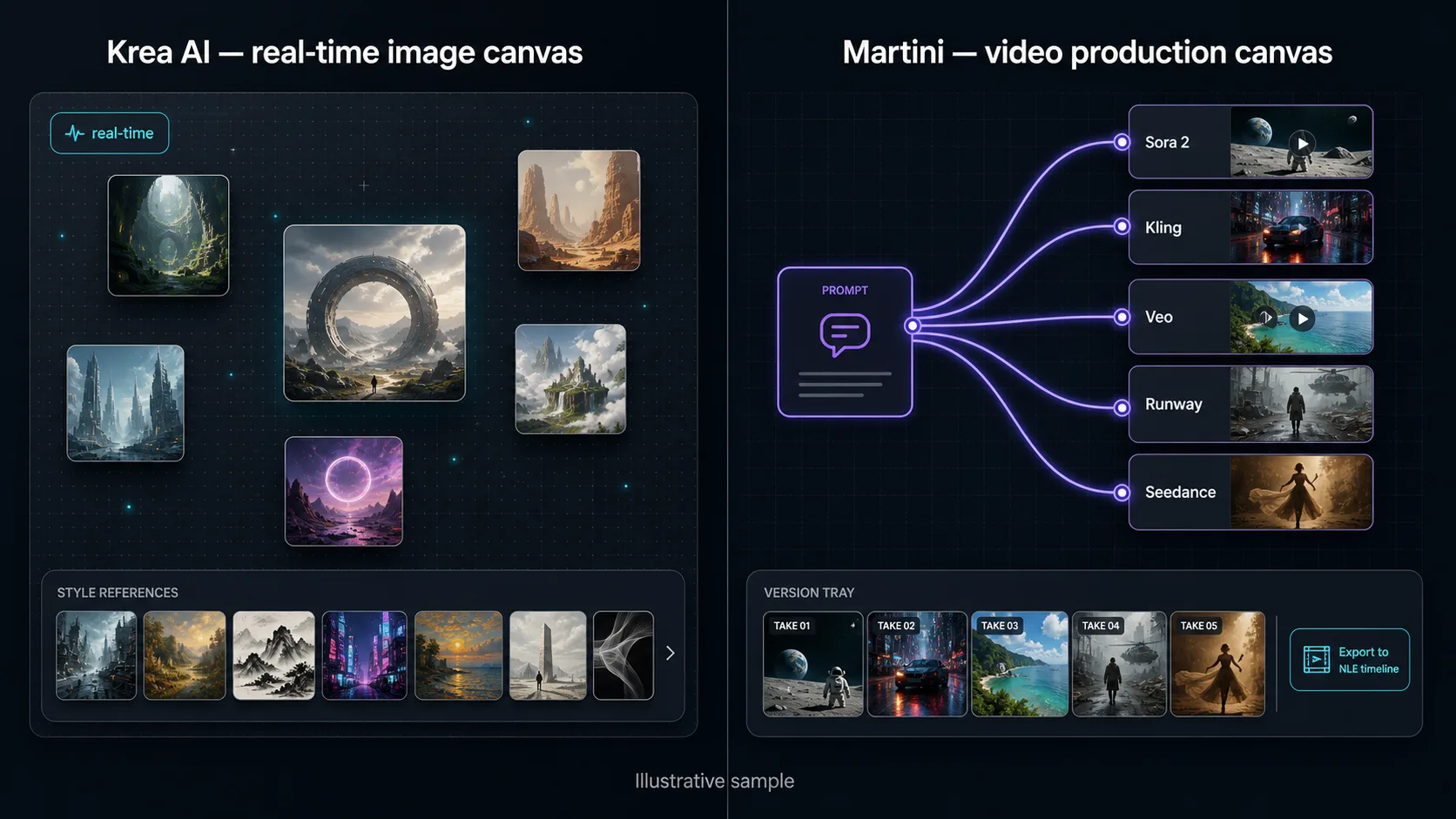
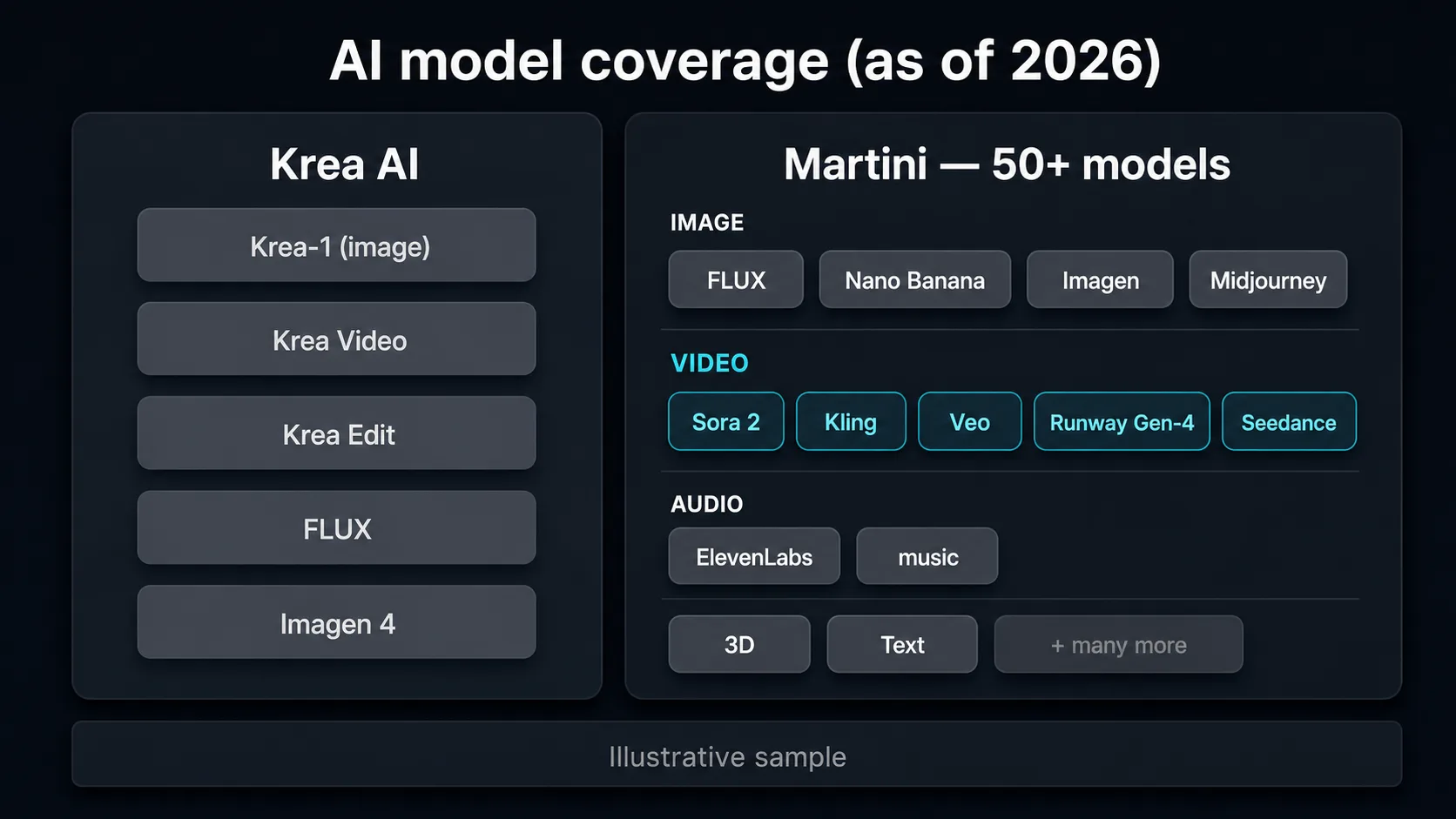
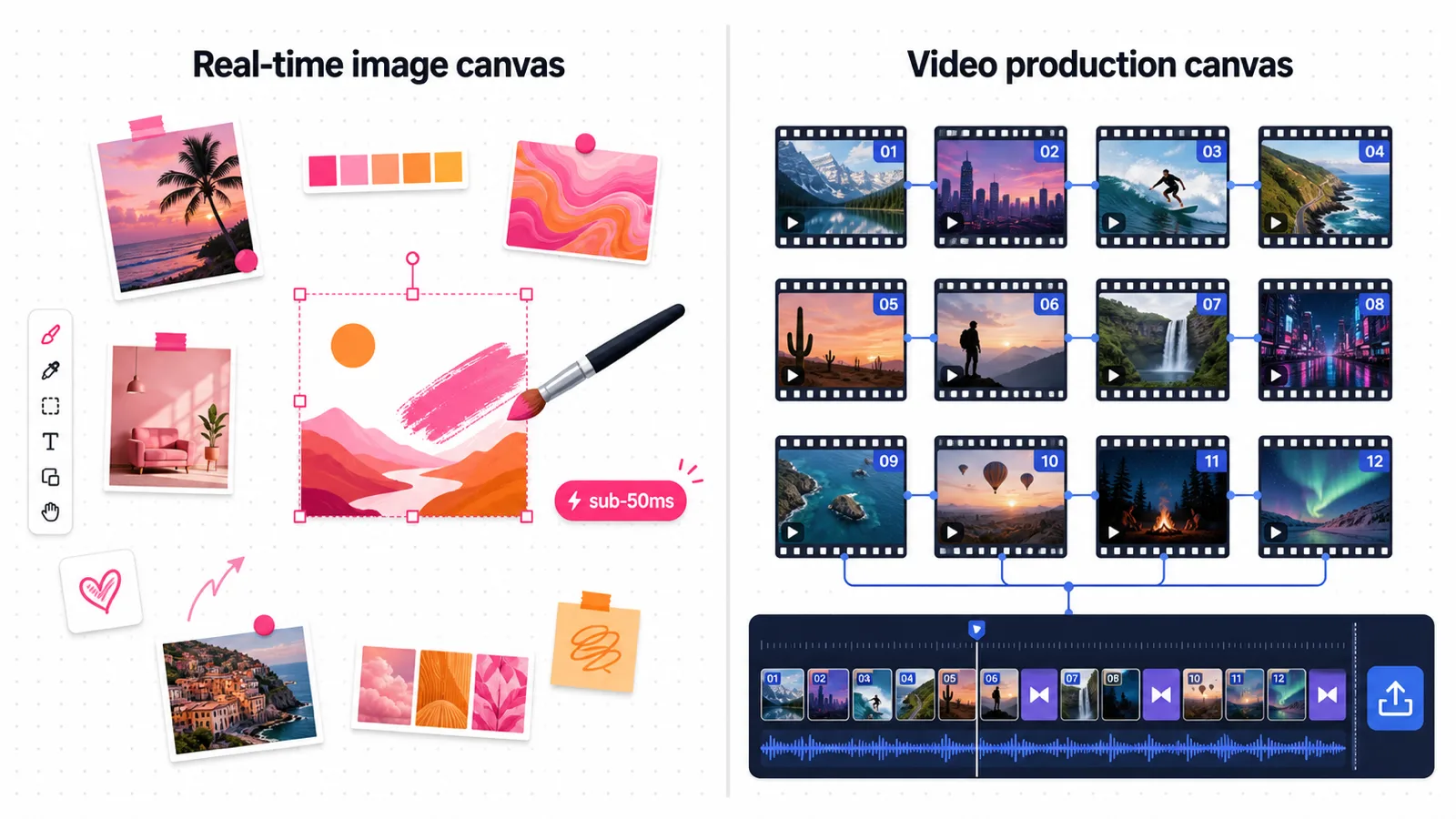
Krea AI and Astorie are both infinite-canvas AI tools, but they win different jobs. Krea AI owns the real-time image canvas: sub-50ms rendering, style references, moodboards, and Krea Edit make it the fastest surface for solo image exploration and concept art. Astorie is the infinite canvas built for video production — its signature move is fan-out: wire one prompt or source image into many nodes and run it across 50+ frontier image and video models at once (Sora 2, Kling, Veo, Runway Gen-4, Seedance), keep every take in a version tray, then export an XML/EDL timeline to Premiere, DaVinci, or Final Cut Pro. As of 2026, pick Krea to explore and refine images in real time; pick Astorie to produce multi-shot video across many models on one canvas.
See them side by side
When to choose Astorie
- You want to fan one prompt or source image across 50+ frontier image AND video models at once — Sora 2, Kling, Veo, Runway Gen-4, Seedance — and compare every take in a version tray, instead of generating one model at a time.
- Video production is the job: storyboard a multi-shot piece, chain image to image-to-video to lip-sync to audio, and finish it on one infinite canvas.
- You hand off to an editor — XML/EDL export carries timing straight into Premiere Pro, DaVinci Resolve, or Final Cut Pro, so the cut is not rebuilt from downloaded clips.
- You need real-time, Figma-like multiplayer collaboration on the same infinite canvas, with workspace billing and per-member credit limits for a team.
- You want an instant style library — save a look as a reusable reference ID and apply it across any node, with no training step.
- You run image, video, audio, 3D, and text on one surface and want pay-per-use credits rather than fixed monthly generation caps.
When to choose Krea AI
- You explore images, illustrations, or concept art and want real-time feedback — Krea's sub-50ms rendering is genuinely the fastest brush-and-see-result loop in 2026.
- Style references and moodboards are your core workflow — Krea is excellent at holding an aesthetic across an image exploration session.
- Krea Edit and in-canvas image editing matter more to you than multi-model video chaining.
- You want to train a custom model on reference images to teach an exact signature look across generations.
- You need ultra-high-resolution upscaling (Krea upscales to 22K) for stills and print work.
- Your loop ends at the image — aesthetic-first exploration on a single-operator canvas, not a multi-shot video pipeline.
Side-by-side comparison
| Attribute | Astorie | Krea AI |
|---|---|---|
| Infinite canvas focus | Production canvas — arrange, chain, and fan out image/video/audio nodes for multi-shot work. | Real-time image canvas — explore, refine, and moodboard stills with sub-50ms feedback. |
| Signature capability | Fan-out: one prompt across 50+ image and video models simultaneously, every take kept in a version tray. | Real-time generation: paint-and-see-result image rendering as you adjust the prompt. |
| Real-time rendering | Queued generations optimized for quality; not a live brush surface. | Sub-50ms real-time canvas — the marquee feature. |
| Model coverage | 50+ models across image, video, audio, 3D, and text (Sora 2, Kling, Veo, Runway Gen-4, Seedance, FLUX, Nano Banana, Imagen). | First-party Krea-1, Krea Video, Krea Edit, plus FLUX and Imagen 4 integrations. |
| Frontier video fan-out | Run the same shot across Sora 2, Kling, Veo, Runway, and Seedance side-by-side, then pick the winner. | Krea Video is first-party and narrower; cross-model video chaining is lighter. |
| Style consistency | Style library — save a look as a reusable reference ID, apply it across any node, no training. | Style references plus optional custom model training for a signature aesthetic. |
| Real-time collaboration | Figma-like multiplayer — multiple editors on one live canvas with workspace billing. | Built around a single operator; team usage on higher plans. |
| Image editing | Node-based edits plus reference inputs and inpaint-style models on the canvas. | Krea Edit — strong in-canvas image editing and enhancement. |
| Professional export | XML/EDL timeline to Premiere Pro, DaVinci Resolve, Final Cut Pro. | MP4/PNG download; upscaling to 22K; no native NLE timeline export. |
| Setup | Browser-based, no GPU, no install — works on any machine. | Browser-based, no GPU, no install. |
| Pricing model | Free tier (200 credits/mo, all models) plus pay-per-use plans $20–$150/mo. | Tiered subscriptions, roughly $0–$60/mo (as of 2026). |
| Best for | Multi-model video production and team workflows on one canvas. | Real-time image exploration, concept art, and moodboarding. |
Workflow comparison
| Step | Astorie | Krea AI |
|---|---|---|
| Explore concepts and stills | Place image nodes across FLUX, Nano Banana, Imagen, and Midjourney; fan one prompt across all of them and compare results in a version tray. | Real-time canvas with sub-50ms rendering — brush-and-see-result ideation, refined live per generation. |
| Lock a consistent look | Save a style as a reusable reference ID and apply it across any image or video node — no training step. | Use style references and moodboards, or train a custom model on reference images to hold a signature aesthetic. |
| Edit and refine an image | Wire reference inputs and editing models into the node; iterate non-destructively on the canvas. | Use Krea Edit for fast in-canvas image editing, enhancement, and upscaling to 22K. |
| Animate stills into video | Fan one still across Sora 2, Kling, Veo, Runway Gen-4, and Seedance at once, then keep the best take from the version tray. | Generate clips with Krea Video; running the same shot across many frontier video models is not the core loop. |
| Add audio, music, and lip-sync | ElevenLabs voiceover and music nodes plus lip-sync on the same canvas, aligned to clip durations. | Image-and-video focused; most teams step out to dedicated audio and lip-sync tools. |
| Collaborate and finish | Multiple editors share one live canvas; export an XML/EDL timeline into Premiere, DaVinci, or Final Cut Pro. | Single-operator canvas; download MP4/PNG assets and rebuild the timeline manually in an NLE. |
Pricing compared
| Plan | Astorie | Krea AI |
|---|---|---|
| Free | Free · 200 credits/month renewable · all 50+ models · no card | Free · limited daily generations (as of 2026) |
| Entry paid | Standard · $20/month · 1,600 credits · pay-per-use | Basic · ~$10/month · modest monthly limits |
| Pro | Pro · $50/month · 5,400 credits | Pro · ~$35/month · larger monthly allowance |
| Top tier | Ultimate · $150/month · 17,000 credits | Max · ~$60/month · highest allowance plus early features |
| Top-ups | $1 per 100 credits · 90-day expiry | Add-on credits / team usage on higher plans |
Pricing and operational tradeoffs
- Astorie: free tier with 200 credits/month and no card required — the full infinite canvas and all 50+ models are unlocked on the free tier.
- Astorie paid plans are pay-per-use by credits: Standard $20/month (1,600 credits), Pro $50/month (5,400 credits), Ultimate $150/month (17,000 credits), plus $1 per 100 credits in top-ups (90-day expiry).
- Krea AI uses tiered subscriptions — a free tier with limited daily generations, then paid plans roughly $10–$60/month (as of 2026), metered by generation credits across its first-party models.
- For light image exploration, Krea's free tier or entry plan is hard to beat; for consistent multi-model video production or collaborative work, Astorie's pay-per-use credits scale more predictably.
Which to choose by use case
Creator exploring images and concept art in real time
Recommendation: Krea AI
Sub-50ms real-time rendering makes solo image ideation faster than any queued workflow.
Designer building moodboards with style references
Recommendation: Krea AI
Style references, moodboards, and Krea Edit are tuned for aesthetic-first image exploration.
Team producing multi-shot video across many models
Recommendation: Astorie
Fan-out runs one prompt across Sora 2, Kling, Veo, and Runway at once, then exports an NLE timeline.
Studio handing a cut to Premiere, DaVinci, or Final Cut
Recommendation: Astorie
XML/EDL export carries timing into the NLE; Krea ends at the asset download.
Distributed team editing live on one canvas
Recommendation: Astorie
Figma-like multiplayer with workspace billing and per-member credit limits; Krea is single-operator.
Related Astorie workflows
ai-canvas-workflow
/features/ai-canvas-workflow
ai-video-workflow
/features/ai-video-workflow
ai-image-to-video
/features/ai-image-to-video
ai-character-consistency
/features/ai-character-consistency
ai-video-nle-export
/features/ai-video-nle-export
ai-camera-control
/features/ai-camera-control
ai-storyboard-generator
/features/ai-storyboard-generator
Related models
Related how-to guides
Related workflows
Compare with other tools
Related reading
Frequently asked questions
- Does Krea AI have an infinite canvas?
- Yes — Krea AI has an infinite canvas built for real-time image exploration, with style references, moodboards, and Krea Edit. It is image-exploration-led: you generate and refine stills with sub-50ms feedback. Astorie also has an infinite canvas, but its focus is video production — arranging and chaining image, video, and audio nodes for multi-shot work, then exporting a timeline to your NLE.
- Is Krea AI good for video generation?
- Krea AI does video through its first-party Krea Video, and it is solid for short clips. But video is not its center of gravity — Krea optimizes hardest for real-time image exploration. For video, Astorie is the stronger infinite canvas: it can fan one prompt across Sora 2, Kling, Veo, Runway Gen-4, and Seedance simultaneously, keep every take, and export an XML/EDL timeline to Premiere, DaVinci, or Final Cut Pro.
- What is the best Krea AI alternative?
- For multi-model video production on an infinite canvas, Astorie is the best Krea AI alternative as of 2026 — it adds frontier-video fan-out across 50+ models, multiplayer collaboration, and NLE timeline export. If you only need real-time image exploration, Krea is hard to beat; broader image-canvas peers include Freepik Spaces and Flora. Choose by job: image play versus video production.
- Krea AI vs Astorie — which is better for AI video?
- Astorie is better for AI video. Its signature fan-out runs one prompt or source image across many frontier video models at once (Sora 2, Kling, Veo, Runway Gen-4, Seedance), keeps every take in a version tray, and exports a timeline to your editor. Krea AI is better for real-time image exploration and concept art. Both run in the browser with no GPU or install.
- How much does Krea AI cost?
- As of 2026, Krea AI offers a free tier with limited daily generations, then tiered subscriptions roughly $10–$60/month metered by generation credits. Astorie offers a free tier with 200 credits/month and all 50+ models unlocked, then pay-per-use plans at $20, $50, and $150/month, plus $1-per-100-credit top-ups. Krea bundles its first-party stack; Astorie meters per model.
- Can I chain multiple AI models on Krea's canvas?
- Krea's canvas is built for real-time image exploration with its first-party models plus FLUX and Imagen integrations, so cross-modality chaining is lighter. Astorie is built for chaining: wire any model's output into the next — image to image-to-video to lip-sync to audio — and fan one input across 50+ models at once. If multi-model chaining is the job, Astorie is the stronger canvas.
- What is the difference between Krea AI and Astorie for the creative suite?
- Krea AI's creative suite centers on real-time image generation, style references, moodboards, Krea Edit, and 22K upscaling — an image-first suite. Astorie's suite centers on video production across 50+ models: image, image-to-video, audio, lip-sync, 3D, and text on one canvas, with multiplayer collaboration and NLE export. Krea is the image suite; Astorie is the production suite.
- Do Krea AI or Astorie require a GPU or local install?
- Neither requires a GPU or a local install. Both Krea AI and Astorie run entirely in the browser, so they work on any laptop. Astorie adds cloud-native multiplayer so a whole team can share one infinite canvas, while Krea is designed around a single operator at the real-time canvas.
Try Astorie for your next project
Open Astorie and wire up your workflow on the canvas. Free to start — no card required.