Workflow
AI Character Consistency Workflow
To keep an AI character consistent, separate identity (face, hair, proportions, signature items) from scene (location, action, lighting) and anchor identity with the same reference image and prompt wording every time. This guide turns that principle into a repeatable 2026 workflow on Martini's canvas: build a character bible, lock one canonical reference, fan that reference into many image and video models at once, hold the face across every shot, and finish on 4K hero frames — all on a single graph with no GPU and no local install. The one lesson that beats every prompt trick: identity lives in the reference image, not the words, so describe only the scene and let the anchor carry the face.
When to use this workflow
- Producing a 12-week AI influencer or avatar drop where the same face appears in every weekly cut
- Building a brand mascot or recurring spokesperson the team reuses across an entire campaign
- Locking the protagonist across an episodic AI series so every episode opens on the same character
- Rendering cinematic, 4K-clean hero frames of one subject for posters, thumbnails, and key art
- Generating shot coverage for a narrative scene with two anchored leads in dialogue
- Holding subject consistency across a webtoon, Substack serial, novel cover, or comic panel set
- Replacing the per-shot re-prompt habit with a single anchor that holds across a full bundle
Required inputs
- A character bible — a fixed written profile of age, build, hair, skin tone, face shape, and signature items
- A canonical reference image — one master portrait, not multiple competing "ideal" versions
- Wardrobe and expression variants the script requires (default, alt outfit, hero pose, three reactions)
- Per-shot motion intent and dialogue beats so prompts stay scene-led, not identity-led
- A scene list marking which shots are master coverage versus reverse, cutaway, or close-up
- A target output resolution per deliverable (1080p for social, 4K for key art and CTV)
Steps
- 1
1. Write the character bible before you generate anything
A character bible is a fixed written profile of a character's appearance and signature traits — age, build, hair color and length, skin tone, face shape, eye color, and non-negotiable items like a scar, glasses, or a red jacket. Write it as a short, concrete checklist, not a mood paragraph. This is the identity half of the identity-versus-scene split: every trait in the bible must hold across every image and shot, while everything else (location, action, lighting, camera) is free to change. Keep the bible as a text node on the canvas so it stays visible and re-usable for the whole project. The bible is what you check drift against later — without it, "consistent" is a vibe instead of a spec.
- 2
2. Generate the canonical portrait on Nano Banana 2
Open the canvas, drop a Nano Banana 2 image node, and write a front-facing portrait prompt that spells out every trait in the character bible. Generate four to six candidates, then pick the single strongest image and lock it as the canonical reference. Resist keeping two close runner-ups — most models average multiple anchors, and the face drifts toward the midpoint of whatever you feed. One canonical portrait is the foundation every later step inherits. Label this node "char-anchor" so it surfaces cleanly in the bin after export, and treat it as read-only from here on.
- 3
3. Refine the still to a clean, high-resolution master
Pin the canonical portrait as the upstream image-anchor and refine it in place rather than regenerating from scratch. If the still has soft edges, low-resolution artifacts, or color noise, run a cleanup pass on Nano Banana 2 or Flux Kontext, then send the result through an upscale node so the master holds at 4K. This matters more than it looks: raw portraits drift in video far more than refined stills, and a 4K-clean reference produces sharper face preservation downstream because the model has more identity detail to lock onto. The refined, upscaled version becomes the master reference everything downstream inherits.
- 4
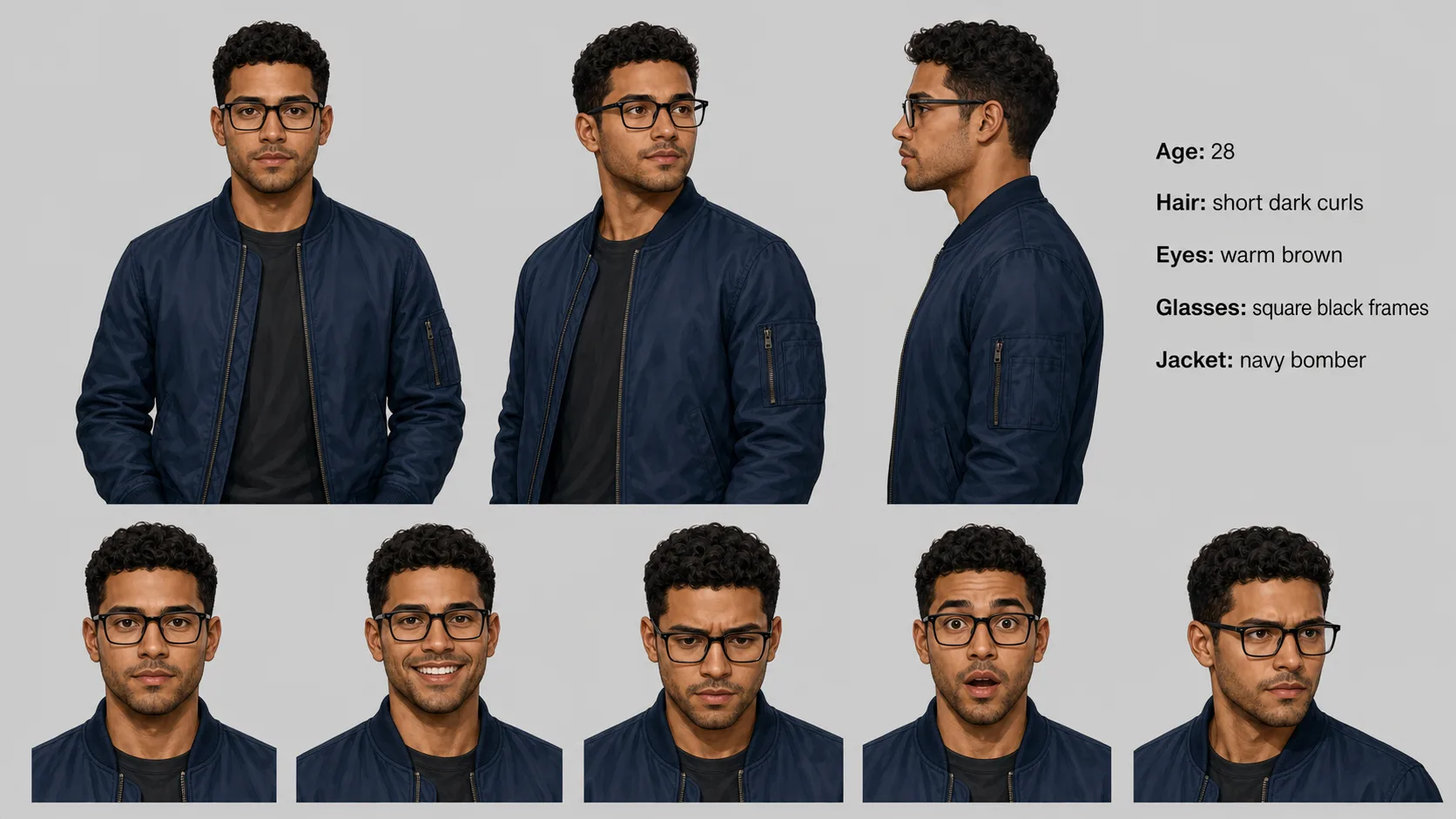
4. Build the character sheet — turnarounds and expressions on Flux Kontext
Wire the master portrait into a Flux Kontext node and produce a character sheet: three-quarter turn, profile, an expression set (happy, focused, surprised, sad, determined), and any outfit alternates the script needs. Flux Kontext is edit-aware — it holds the locked face while changing only what surrounds it, which is exactly the face-preservation behavior these queries are asking for. Stick to concrete edits (outfit, pose, environment, expression) and avoid subjective ones like "more handsome" or "softer face," which cause the model to regress off the bible. The finished sheet is your reusable character reference — the same role a turnaround sheet plays in a traditional animation pipeline.
- 5
5. Curate the strongest still per shot, lay them in cut order
Lay the curated stills left to right on the canvas in cut order: master, three-quarter, profile, reverse, reaction. This becomes a visual storyboard the team scans in one pass before committing any video credits. Mark the hero stills the script depends on — the close-up beat, the hero pose, the reaction shot — and earmark the ones that need a 4K finish. Re-run only the weak frames, never the whole sheet. The cleaner this still bench is before video, the cheaper and more consistent every downstream generation runs.
- 6
6. Carry the reference into video — reference-to-video, not re-prompting
Connect each curated still to its own video node and choose the model by shot intent. Use Vidu when you need to feed multiple character reference images for cross-shot identity. Use Kling O3 for character-aware motion in dialogue and reaction beats. Use Kling 3 for cinematic camera moves with strong identity anchoring. The same canonical reference threads through every node, and the rule never changes: never re-describe the character in a video prompt, only describe the action and camera. The image is the identity contract; the video prompt is the motion contract. This reference-to-video carry is what holds the same face across shots instead of generating a new lookalike each time.

Illustrative sample — representative output, not a verbatim model render - 7
7. Fan out every shot in parallel and check cross-shot continuity
Trigger every video node at once from the canvas — fan-out is the signature move here, wiring one locked reference into many frontier image and video models simultaneously and keeping every take in a version tray. Because the branches run in parallel, wall time tracks the slowest generation, so fanning eight shots costs roughly the same as fanning two. Once the first pass finishes, scrub the cuts in order and check identity against the character bible: eye color, hair length, jawline, signature items. Drift past five to ten seconds is a model limit on most generators, not a workflow failure — for longer takes, chain shorter clips with a last-frame hand-off rather than asking one generation to hold for fifteen seconds.
- 8
8. Re-run only the weak shots, finish heroes at 4K, export to NLE
Keep the strong cuts and regenerate only the shots where identity slipped — tweak the per-shot motion prompt, never the character description, and if a shot keeps drifting swap its reference to a closer view of the face. Send the hero frames the project leans on through an upscale node for a 4K finish, then drop a sequence-builder node, wire the approved outputs in cut order, add audio where the script needs it, and ship a labeled bundle from the NLE export node to Premiere, DaVinci Resolve, or Final Cut with cut order and node names preserved. Finally, save the canvas as a character template — week two of the drop reuses the wiring with a fresh script and the same locked face.
Recommended models
Martini canvas notes
- The canonical reference is one image node with many downstream connections — drop once, anchor everywhere; never duplicate the source.
- Flux Kontext takes the locked portrait as a reference slot and edits around it, so outfit, pose, and expression changes do not regenerate the face — that is the face-preservation mechanic these queries want.
- Vidu accepts multiple character reference images on its node, so the character sheet plus the master portrait gives the strongest cross-shot identity carry into video.
- Fan-out runs every model branch in parallel and stacks every take in a version tray, so you compare consistency across models side by side instead of one slow serial run.
- Upscale nodes bring hero stills and final clips to 4K for cinematic, key-art-grade output without leaving the canvas.
- The sequence builder previews continuity on the canvas, so identity drift is visible before you commit to NLE export.
Variations
Consistent avatar / AI influencer weekly drop
One canvas template, one canonical reference, one weekly script. Swap script and outfit anchor each week; the same face holds across twelve cuts for the avatar drop.
Two-character dialogue scene
Two canonical references, two anchor nodes, both wired into Kling O3 for shot-reverse-shot coverage. Each shot inherits its own character anchor so neither lead drifts.
Brand mascot pose bible
Generate the master portrait, fan out a dozen outfit and expression variations on Flux Kontext, and export a static character bible the design team references for years.
4K cinematic key art
Lock the subject, render hero frames, then upscale to 4K for posters, thumbnails, and title cards. Cinematic consistent-character rendering at print resolution without a render farm.
Episodic AI series intro
Lock the protagonist once at season start. Each episode reuses the same anchor; the template scales across thirteen episodes with no per-episode re-prompting.
Related features
AI Character Consistency Across Images and Video
Keep a subject consistent across image and video generations on Martini using reference workflows.
Consistent Character AI Video — Reference-Driven Video on Martini
Preserve character identity through reference-driven video models on Martini.
AI Character Reference — Reference-Image Workflows on Martini
Use reference images to guide AI model outputs on Martini's canvas.
AI Character Design — Game and Story Characters on Martini
Design original characters for games, stories, and animations on Martini's canvas.
AI Video Reference Images — Preserve Subject and Style
Lock subject, character, and style across every video generation on Martini's canvas — Vidu, Kling O3, Seedance 2, Nano Banana 2 reference workflows.
AI Avatar Video Generator — Talking Avatars from Image and Audio
Create talking avatar videos from image and audio on Martini's canvas — Kling Avatar, OmniHuman, ElevenLabs, locked identity across every clip.
Multi-Shot AI Video — Build Connected Scenes, Not Isolated Clips
Plan, generate, and sequence multi-shot AI video on Martini — keep characters, style, and motion consistent across shots.
Related how-to guides
generate-consistent-character · nano-banana-2
/en/how-to/generate-consistent-character/nano-banana-2
generate-consistent-character · flux-kontext
/en/how-to/generate-consistent-character/flux-kontext
create-video-with-reference-character · vidu
/en/how-to/create-video-with-reference-character/vidu
create-video-with-reference-character · kling-o3
/en/how-to/create-video-with-reference-character/kling-o3
create-multi-shot-video
/en/how-to/create-multi-shot-video
create-storyboard-frames
/en/how-to/create-storyboard-frames
Related reading
how-to-build-consistent-ai-character
/blog/how-to-build-consistent-ai-character
ai-character-design-from-concept-to-canvas
/blog/ai-character-design-from-concept-to-canvas
ai-influencer-production-workflow
/blog/ai-influencer-production-workflow
nano-banana-2-workflows
/blog/nano-banana-2-workflows
kling-3-guide
/blog/kling-3-guide
Related docs
Frequently asked questions
How do you keep an AI character consistent across images?
Separate identity from scene, then anchor identity with one reference image. Write a character bible that fixes the face, hair, proportions, and signature items, generate a single canonical portrait, and feed that same portrait into every new image as a reference. Describe only the scene that changes — location, outfit, pose, lighting — and never re-describe the face, because the words pull the model off the anchor. On Martini you lock the portrait as one upstream node and wire it into every downstream generation, so identity stays addressable instead of being re-rolled each time.
How do I create a consistent character in AI video?
Carry the same reference image into the video nodes and describe only motion, never the character. Lock a canonical portrait, refine it to a clean high-resolution master, then use reference-to-video models — Vidu for multi-reference cross-shot identity, Kling O3 for character-aware dialogue motion, Kling 3 for cinematic camera moves. The image is the identity contract and the prompt is the motion contract; re-prompting the character in a video node is the single most common cause of drift. Fan every shot out in parallel on the canvas and the same locked face threads through the whole bundle.
What is a character bible / reference image?
A character bible is a fixed written profile of a character's appearance and signature traits — age, build, hair, skin tone, face shape, eye color, and non-negotiable items like glasses or a scar. The reference image is the visual counterpart: one canonical, high-resolution portrait that becomes the anchor every later generation inherits. Together they form the identity contract — the bible lists what must never change, and the reference image carries the exact face so prompts only have to describe the scene. Keep both on the canvas as reusable nodes for the whole project.
Which AI model is best for character consistency?
It depends on the stage, which is why fanning across several on one canvas wins. For locking and refining the canonical face, Nano Banana 2 is the strongest portrait anchor. For face-preserving edits — outfit, pose, expression, scene swap — Flux Kontext is edit-aware and holds identity while changing surroundings. For carrying the character into video, Vidu accepts multiple reference images for cross-shot identity, Kling O3 handles character-aware dialogue and reaction motion, and Kling 3 delivers cinematic camera moves with strong anchoring. On Martini you wire one reference into all of them and compare takes in the version tray instead of betting on a single tool.
How do I preserve a face across different scenes?
Use an edit-aware, face-preserving model and change only the scene, not the subject. Flux Kontext takes the locked portrait as a reference slot and edits around it, so you can move the character into a new location, swap the outfit, or change the expression while the face stays fixed. The discipline that makes it work is prompt restraint: write concrete scene edits ("standing in a rainy alley, three-quarter view") and avoid subjective face edits ("make her prettier"), which cause the model to regress off the reference. The same locked portrait drives every scene, so the face is preserved by construction.
Can I reuse the same AI person in multiple prompts?
Yes — that is the entire point of anchoring to one reference. Lock a single canonical portrait as an upstream node and wire it into as many downstream image and video prompts as you need; each prompt describes a new scene while the reference carries the identity. On Martini the source lives once on the canvas and fans out to every node, so reusing the character is a connection, not a re-generation. Save the canvas as a template and the same person reappears across next week's shots with a fresh script and the same locked face.
How do I render a consistent character in 4K?
Lock identity first, then finish the chosen frames through an upscale node to 4K. Consistency is decided at the reference stage — a clean, high-resolution master portrait gives the model more identity detail to preserve — so refine and upscale the anchor before generating, then upscale the hero frames and final clips at the end for cinematic, key-art-grade output. This is how you hit "4K consistent character rendering" without a render farm: the canvas holds the locked reference, the upscale node delivers the resolution, and the face stays the same across every 4K hero frame.
Can I use this workflow for a real-person likeness or avatar?
Only with consent. Generating likenesses of real people without explicit permission is a legal and ethical issue, and several platforms prohibit it. For original characters and avatars, this workflow is the right tool — build the bible, lock the reference, and reuse it freely. For a real spokesperson, license the likeness, generate with permission, and disclose AI use when client policy or platform terms require. The same caution applies to style mimicry of named IP or living artists: brief original art direction (palette, line weight, lighting) rather than naming a studio.
Build it on the canvas
Open Martini and wire this workflow up in minutes. Free to start — no card required.