Comparison
Best ComfyUI Cloud Alternative in 2026: Run Node Workflows Online, No GPU
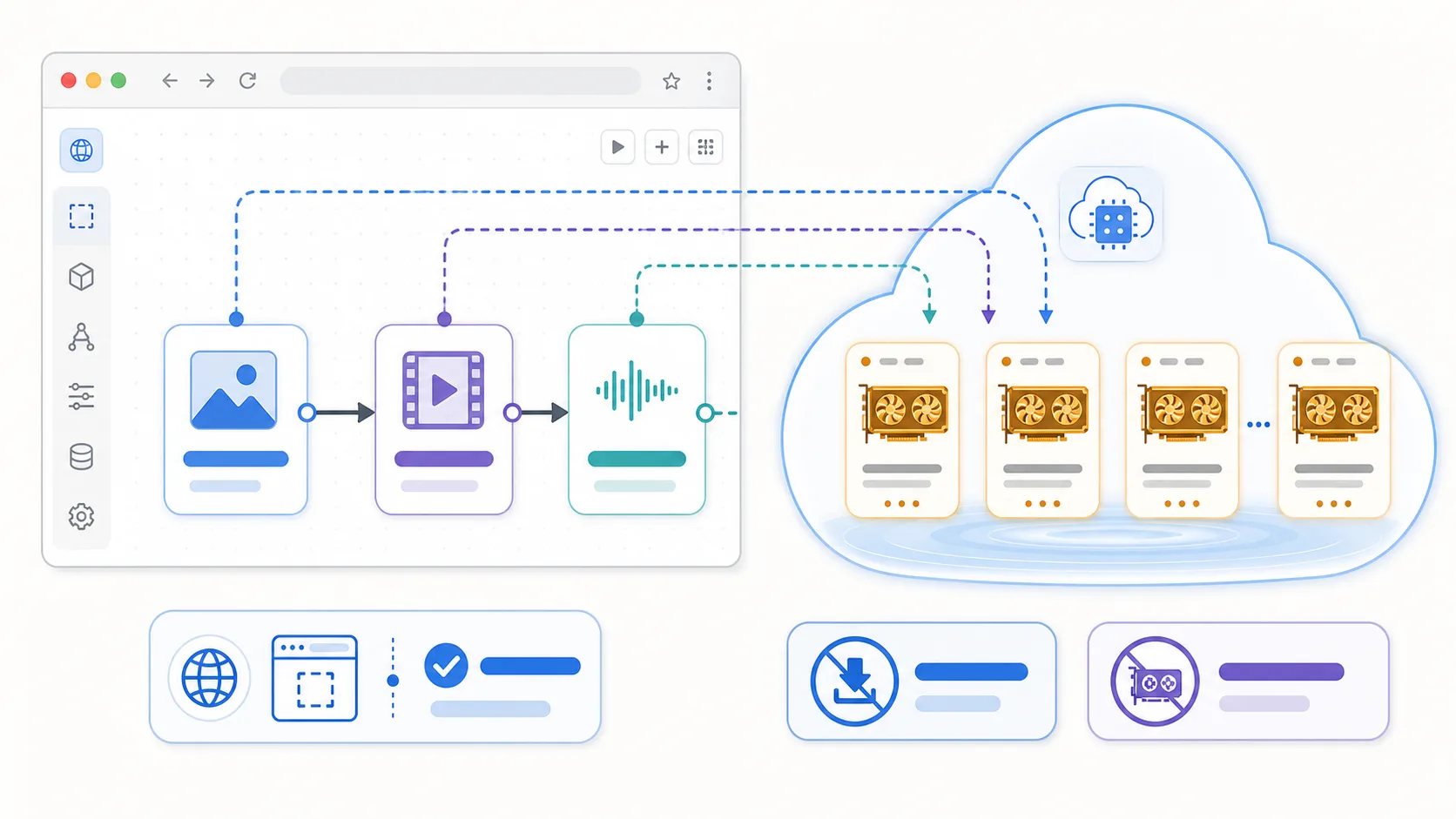
The best ComfyUI cloud alternative is a browser-based node canvas that runs models on remote compute, so you skip the Python install, CUDA setup, and a $1,000+ GPU. For AI video and multi-modal production, Martini is the strongest pick — same node-graph mental model, but image, video, audio, lip-sync, and NLE export run in the cloud on one canvas. If you specifically want to run ComfyUI itself in the cloud (your exact graphs, custom nodes, and LoRAs), use a managed ComfyUI host like RunComfy or ThinkDiffusion. Ranked below: Martini, Krea Nodes, Freepik Spaces, Wireflow, RunComfy, ThinkDiffusion, fal.ai, and Replicate. Last updated May 2026.
See them side by side

When to choose Martini
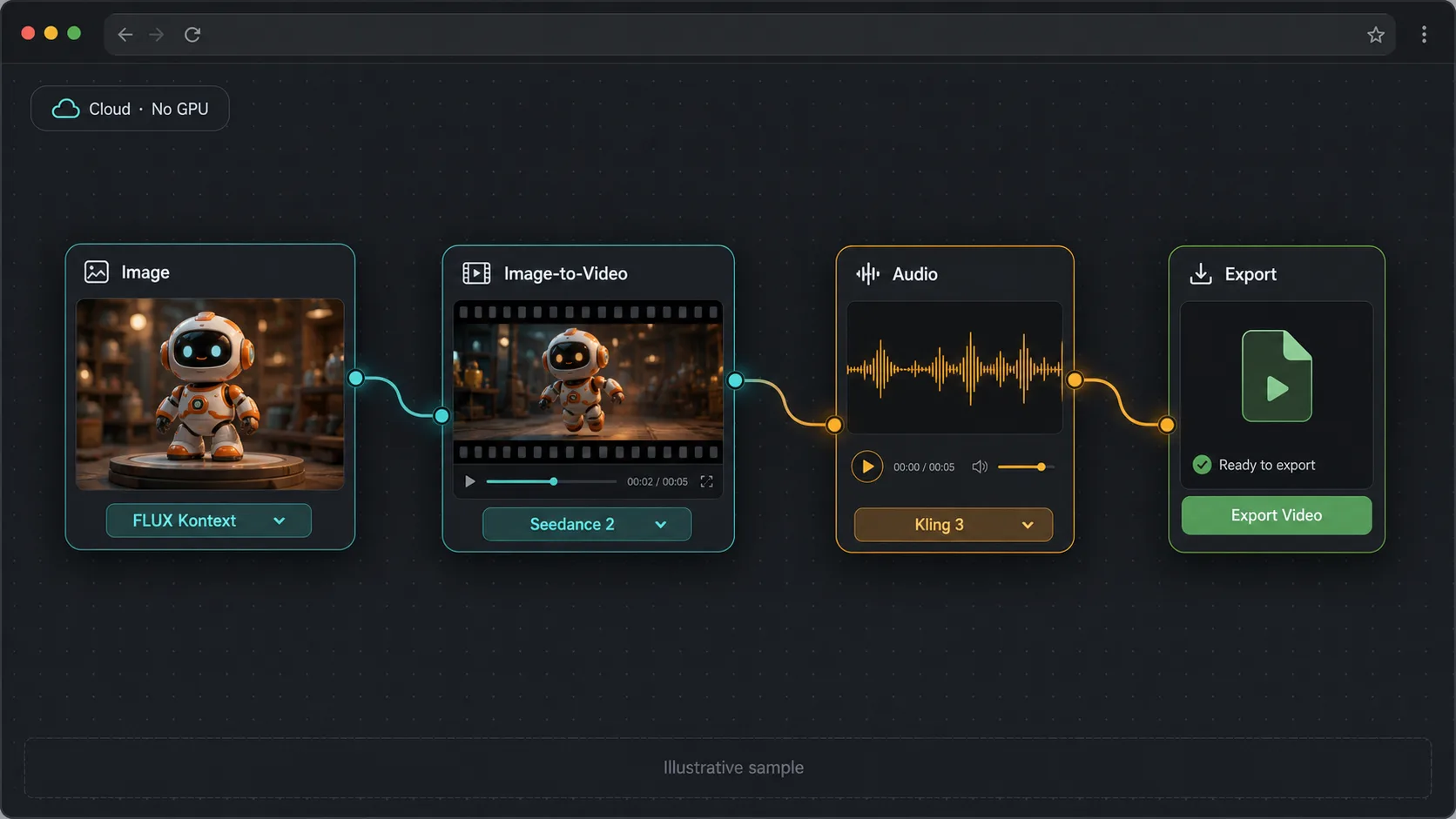
- Best overall cloud alternative for AI video: Martini runs a node graph in the browser with image, video, audio, music, lip-sync, 3D, and LLM as first-class nodes — no Python, no CUDA, no GPU.
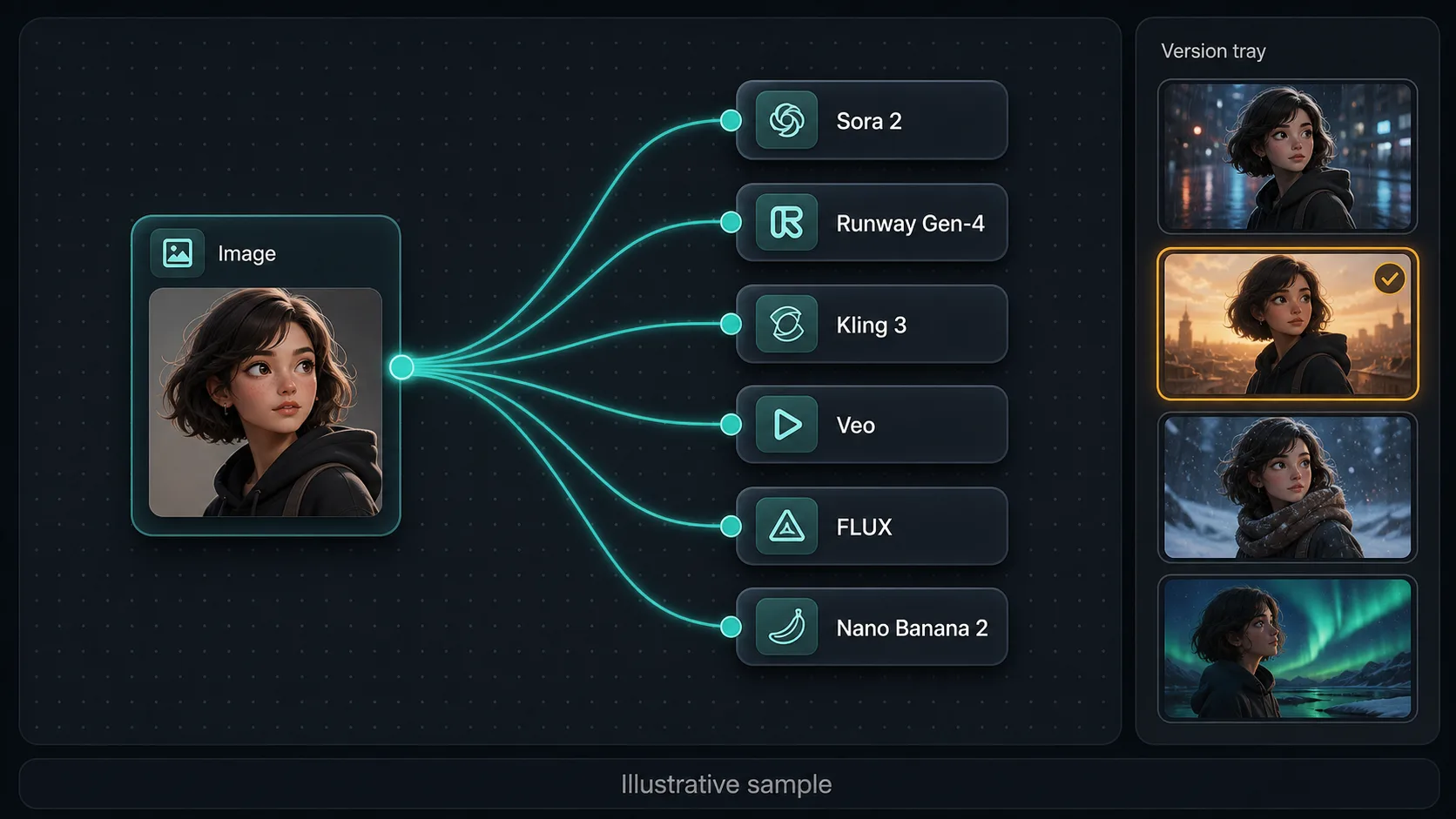
- You want to fan one prompt or reference image out across many frontier image AND video models at once (Sora 2, Runway Gen-4, Kling 3, Veo, Seedance 2, FLUX, Nano Banana 2), keep every take in a version tray, and pick the winner.
- You produce video, not just stills — image-to-video, voiceover, lip-sync, storyboard, and NLE export (Premiere Pro, DaVinci Resolve, Final Cut) live in one project instead of a separate timeline tool.
- You collaborate with non-technical teammates — editors, designers, producers — who need a shared multiplayer canvas, not SSH access to a GPU box.
- You run a team that needs workspace billing, per-member credit limits, and shared model presets, with a free tier (200 credits/month) to start and no card.
- You work from a laptop, tablet, or Chromebook — a modern browser produces the same result as an RTX 4090 workstation because generation runs on remote compute.
When to choose ComfyUI Cloud
- You want to run ComfyUI itself in the cloud — your exact .json graphs, ControlNet, custom samplers, LoRA stacks, and 60,000+ community custom nodes — on a managed GPU host like RunComfy or ThinkDiffusion.
- You need deep open-weights Stable Diffusion control (raw latent manipulation, custom schedulers) that a curated canvas does not expose.
- You already maintain a ComfyUI workflow library and want to keep it portable across machines without re-building in a new node system.
- You are an open-source developer comfortable with GPL-3.0 software and renting GPU time per hour rather than paying per generation.
- You burst occasionally and want pay-as-you-go cloud GPU rental (RunComfy, ThinkDiffusion, fal.ai) instead of a flat creative subscription.
Side-by-side comparison
| Attribute | Martini | ComfyUI Cloud |
|---|---|---|
| What it actually is | A cloud-native creative canvas — a node graph that calls 50+ curated models across image, video, audio, 3D, and text. | A managed ComfyUI host (e.g. RunComfy, ThinkDiffusion) runs the open-source ComfyUI app on a rented cloud GPU you control. |
| GPU required | No — fully cloud-rendered; a Chromebook is enough. | No local GPU, but you rent a remote GPU and pay for active GPU time. |
| Setup time | Under 2 minutes — sign up, open the canvas, place a node. | Minutes to launch a hosted instance, then you still load checkpoints, custom nodes, and your workflow JSON. |
| Import existing ComfyUI workflows | No — different node library; you rebuild the production shape with curated multi-modal nodes. | Yes — managed ComfyUI hosts run your existing .json graphs and custom nodes verbatim. |
| Custom nodes / LoRAs | Curated, platform-managed nodes; reference-image conditioning instead of raw ControlNet/LoRA stacks. | Full 60,000+ custom-node ecosystem plus your own LoRAs and checkpoints. |
| Video generation | Native — Sora 2, Runway Gen-4, Kling 3, Veo, Seedance 2, Hailuo, Wan, and more as image-to-video nodes. | Possible via video custom-node packs (e.g. Wan), but you install and maintain them per instance. |
| Multi-model fan-out | Yes — wire one prompt/image into many image and video models at once and compare takes in a version tray. | One graph runs one pipeline; comparing models means duplicating and re-running graphs. |
| Audio, music, lip-sync | Built-in — Suno music, ElevenLabs / Minimax TTS, sound effects, Kling / InfiniteTalk lip-sync. | External tools or extra custom nodes; not a first-class part of the host. |
| NLE export | Direct XML / EDL out to Premiere Pro, DaVinci Resolve, Final Cut Pro. | Export frames and clips; assemble the timeline yourself. |
| Team collaboration | Multiplayer canvas, workspace billing, per-member credit limits, shared presets. | A hosted instance is usually single-user; sharing means exporting workflows or spinning up more instances. |
| Pricing posture | Free tier (200 credits/mo) + flat plans from $20/mo; per-generation credit cost. | Pay for active GPU time (hourly or per-second), so a slow workflow costs more than a fast one. |
| Open source | No — managed cloud platform. | Yes — runs open-source ComfyUI (GPL-3.0) on rented infrastructure. |
Workflow comparison
| Step | Martini | ComfyUI Cloud |
|---|---|---|
| Brief: a 30-second product ad, consistent character across four shots | Open one canvas project; place a reference-image node, fan it into four image-to-video nodes, add voice + music nodes, then an export node. | Launch a hosted ComfyUI instance, load a base image workflow, install a video custom-node pack and ControlNet, validate on the rented GPU. |
| Set up the environment | Already done — sign in and open the canvas. | Spin up the cloud instance, load checkpoints and custom nodes, upload your workflow JSON. |
| Generate stills with a consistent character | Drop reference images on a FLUX Kontext or Nano Banana 2 node; reference-image conditioning carries the look across shots. | Stack ControlNet + IP-Adapter + LoRA nodes; re-debug the chain when an updated custom node breaks. |
| Animate the stills | Each still feeds an image-to-video node — Seedance 2, Kling 3, Runway Gen-4, or Sora 2 — with no extra install. | Run a video custom-node pack on the rented GPU; runtime is billed as active GPU time. |
| Add voiceover, music, and lip-sync | Chain an ElevenLabs or Suno node and a lip-sync node onto the presenter clip — all on the same canvas. | Switch to external audio and lip-sync tools outside the ComfyUI graph. |
| Edit and export | Storyboard timeline plus XML / EDL export straight into Premiere Pro for the final cut. | Download clips and assemble the timeline manually in your NLE. |
Pricing compared
| Plan | Martini | ComfyUI Cloud |
|---|---|---|
| Free / entry | Free · 200 credits/month renewable · all 50+ models · no card | ComfyUI software is free (GPL-3.0); you pay only the cloud host |
| Pay-as-you-go | Top-ups · $1 per 100 credits · 90-day expiry · per-generation | RunComfy / ThinkDiffusion GPU machines billed hourly (≈$0.50–$2+/hr, varies by GPU; as of 2026) |
| Entry plan | Standard · $20/month flat · 1,600 credits | Managed-host starter machine + monthly seat (varies by provider) |
| Pro | Pro · $50/month flat · 5,400 credits | Higher-VRAM hosted GPU tier, billed for active time |
| Top | Ultimate · $150/month flat · 17,000 credits | Self-managed scaling — no single managed top tier |
Pricing and operational tradeoffs
- Martini: free tier with 200 credits per month and no card required — the full canvas and all 50+ models are unlocked on the free tier. Paid plans are flat by usage: Standard $20/month for 1,600 credits, Pro $50/month for 5,400 credits, Ultimate $150/month for 17,000 credits, plus $1 per 100 credits in top-ups (90-day expiry).
- Managed ComfyUI hosts bill for active GPU time, not per generation. RunComfy advertises pay-as-you-go GPU machines (roughly $0.50–$2+ per hour depending on GPU tier) and monthly plans; ThinkDiffusion offers hourly machine tiers from a low-cost "Basic" GPU up to high-VRAM "Ultra" machines (pricing as of 2026).
- fal.ai and Replicate are serverless model APIs, not a ComfyUI UI — you pay per inference (per second or per output), which is closest to Martini's per-call credit model but without a visual canvas.
- ComfyUI the software is free and open-source (GPL-3.0); the only "cloud" cost is the host you rent it on. Running it locally instead costs $500–$1,500+ in GPU hardware plus electricity and maintenance time.
- Cloud GPU time billing means a slow or stuck workflow on a managed ComfyUI host can cost more than expected; Martini's per-generation credit pricing tracks the model's per-call cost and is more predictable for teams (as of 2026).
Which to choose by use case
You want a node canvas online with no GPU and AI video baked in
Recommendation: Martini
Browser-based node graph with image, video, audio, lip-sync, storyboard, and NLE export on one canvas — the strongest no-GPU cloud pick for production.
You must run your existing ComfyUI .json graphs and custom nodes in the cloud
Recommendation: RunComfy or ThinkDiffusion
These managed hosts run the real ComfyUI app on a rented GPU, so your ControlNet, samplers, and LoRA stacks port over unchanged.
You want a fast browser canvas for image exploration and quick stills
Recommendation: Krea Nodes or Freepik Spaces
Both offer a node-style cloud canvas focused on real-time image generation and editing; lighter on multi-model video production than Martini.
You want an open, web-based node editor for image pipelines
Recommendation: Wireflow
A browser node-graph alternative for image workflows — useful if you want the ComfyUI mental model online without local install.
You are a developer who wants models as an API, not a UI
Recommendation: fal.ai or Replicate
Serverless inference APIs for image and video models, billed per call — best when you are wiring models into your own app rather than working on a canvas.
A creative team collaborating live on a campaign
Recommendation: Martini
Multiplayer canvas, workspace billing, and per-member credit limits beat exporting and re-importing workflows between single-user hosted instances.
Related Martini workflows
ai-canvas-workflow
/features/ai-canvas-workflow
ai-video-workflow
/features/ai-video-workflow
ai-image-to-video
/features/ai-image-to-video
ai-character-consistency
/features/ai-character-consistency
ai-lip-sync
/features/ai-lip-sync
ai-storyboard-generator
/features/ai-storyboard-generator
ai-video-nle-export
/features/ai-video-nle-export
ai-voiceover-generator
/features/ai-voiceover-generator
Related models
Related how-to guides
Related workflows
Compare with other tools
Related reading
Frequently asked questions
- What is the best ComfyUI alternative without a GPU?
- The best ComfyUI alternative without a GPU is Martini, a browser-based node canvas that runs every model on remote compute — no Python, no CUDA, and no NVIDIA card. It covers image, video, audio, lip-sync, and NLE export on one canvas, so a laptop, tablet, or Chromebook produces the same result as a workstation. If you must run ComfyUI itself without a local GPU, a managed host like RunComfy or ThinkDiffusion rents the GPU for you.
- Is there a browser-based version of ComfyUI?
- Yes — there are two paths to a browser-based node workflow. Managed ComfyUI hosts (RunComfy, ThinkDiffusion) run the real ComfyUI app in your browser on a rented cloud GPU. Native cloud canvases (Martini, Krea Nodes, Freepik Spaces, Wireflow) give you the same node-graph mental model rebuilt as a SaaS, with Martini adding native AI video, audio, and NLE export.
- Can I run ComfyUI workflows in the cloud?
- Yes. To run your exact ComfyUI .json workflows in the cloud, use a managed ComfyUI host such as RunComfy or ThinkDiffusion — they load your graphs, custom nodes, and LoRAs on a rented GPU and bill for active GPU time. If you only need the production result (consistent stills, image-to-video, edited cut) rather than the literal graph, Martini rebuilds the workflow as curated cloud nodes with no setup.
- Are there free ComfyUI alternatives?
- Yes. ComfyUI itself is free and open-source (GPL-3.0) if you self-host it. For a free cloud option, Martini has a free tier with 200 credits per month and no card, unlocking the full canvas and all 50+ models. Krea and Freepik also offer limited free tiers, and the ComfyUI source on GitHub is free to deploy on any GPU you rent.
- What is the easiest ComfyUI alternative for beginners?
- The easiest ComfyUI alternative for beginners is Martini, because there is nothing to install — you sign up, open the canvas, and place a node in under two minutes. Curated nodes replace ComfyUI's raw samplers and checkpoints, so you can ship a consistent character or an image-to-video shot without learning ControlNet. Krea and Freepik Spaces are also beginner-friendly for quick image generation.
- Which ComfyUI alternative supports video generation?
- Martini is the ComfyUI alternative with the deepest native video support: image-to-video and text-to-video run through Sora 2, Runway Gen-4, Kling 3, Veo, Seedance 2, Hailuo, and more as first-class nodes, plus lip-sync and NLE export. On managed ComfyUI hosts you can add video via custom-node packs (e.g. Wan), but you install and maintain them per instance.
- Can I import my ComfyUI JSON workflows into another tool?
- You can import ComfyUI .json workflows only into a tool that runs ComfyUI itself — managed hosts like RunComfy and ThinkDiffusion load your graphs and custom nodes verbatim. Native canvases such as Martini, Krea, and Wireflow use their own node libraries, so the graph does not import directly; instead you rebuild the production shape with their curated nodes, which usually means far fewer steps.
- Do ComfyUI alternatives support custom models / LoRAs?
- It depends on the alternative. Managed ComfyUI hosts (RunComfy, ThinkDiffusion) support your own custom checkpoints and LoRAs because they run real ComfyUI. Curated cloud canvases like Martini do not load arbitrary LoRAs; instead they offer reference-image conditioning and 50+ managed models, trading raw model control for zero maintenance and built-in video, audio, and team collaboration.
- Run ComfyUI in the cloud, or use a cloud-native canvas instead?
- Run ComfyUI in the cloud (RunComfy, ThinkDiffusion) when you need your exact graphs, custom nodes, and LoRAs untouched. Choose a cloud-native canvas like Martini when the goal is the finished output — consistent characters, multi-model image and video fan-out, audio, lip-sync, and an NLE handoff — and you would rather skip GPU-time billing and custom-node maintenance entirely.
Try Martini for your next project
Open Martini and wire up your workflow on the canvas. Free to start — no card required.