Comparison
Best ComfyUI Alternative for AI Video & Image Workflows (2026)
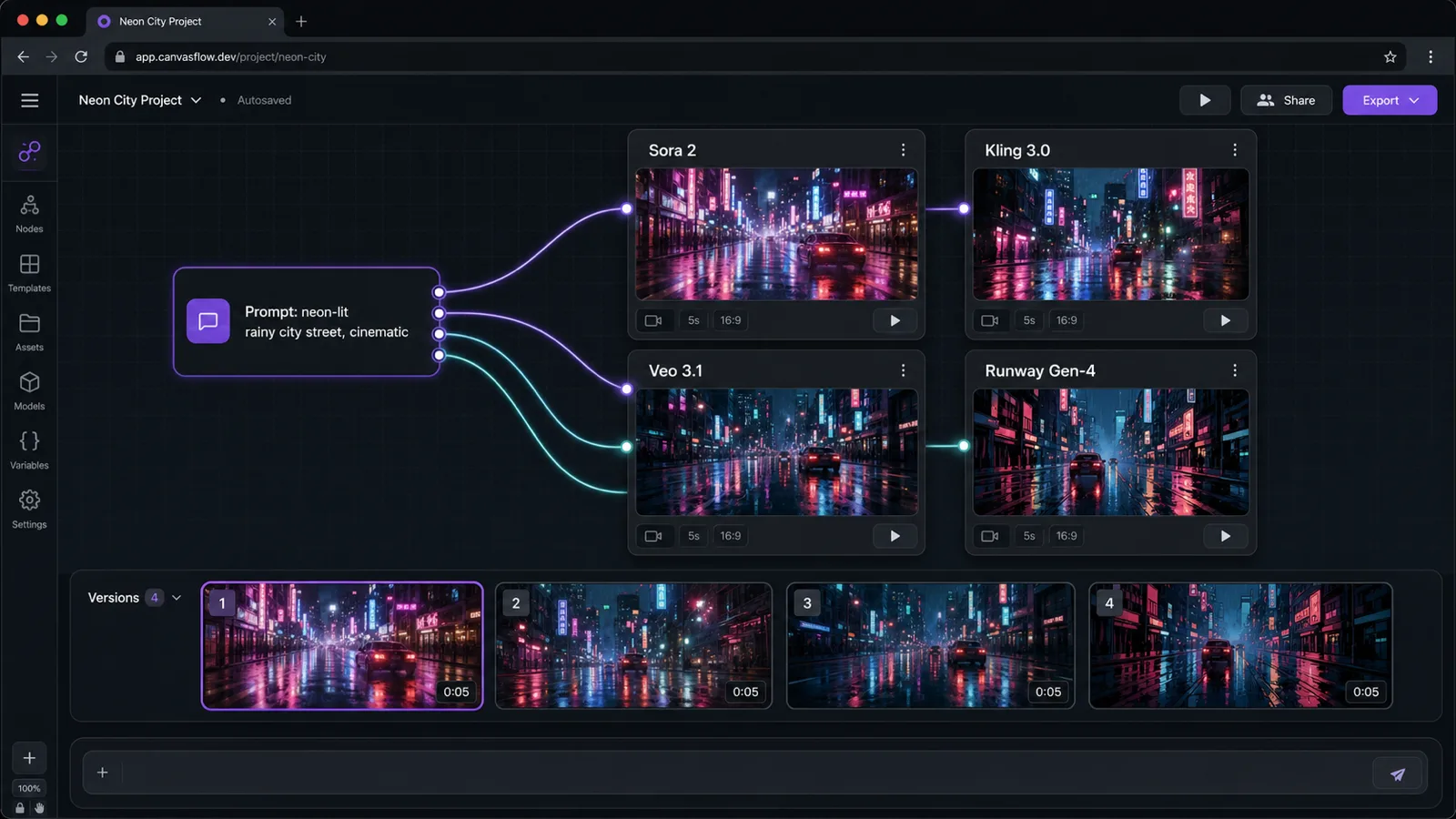
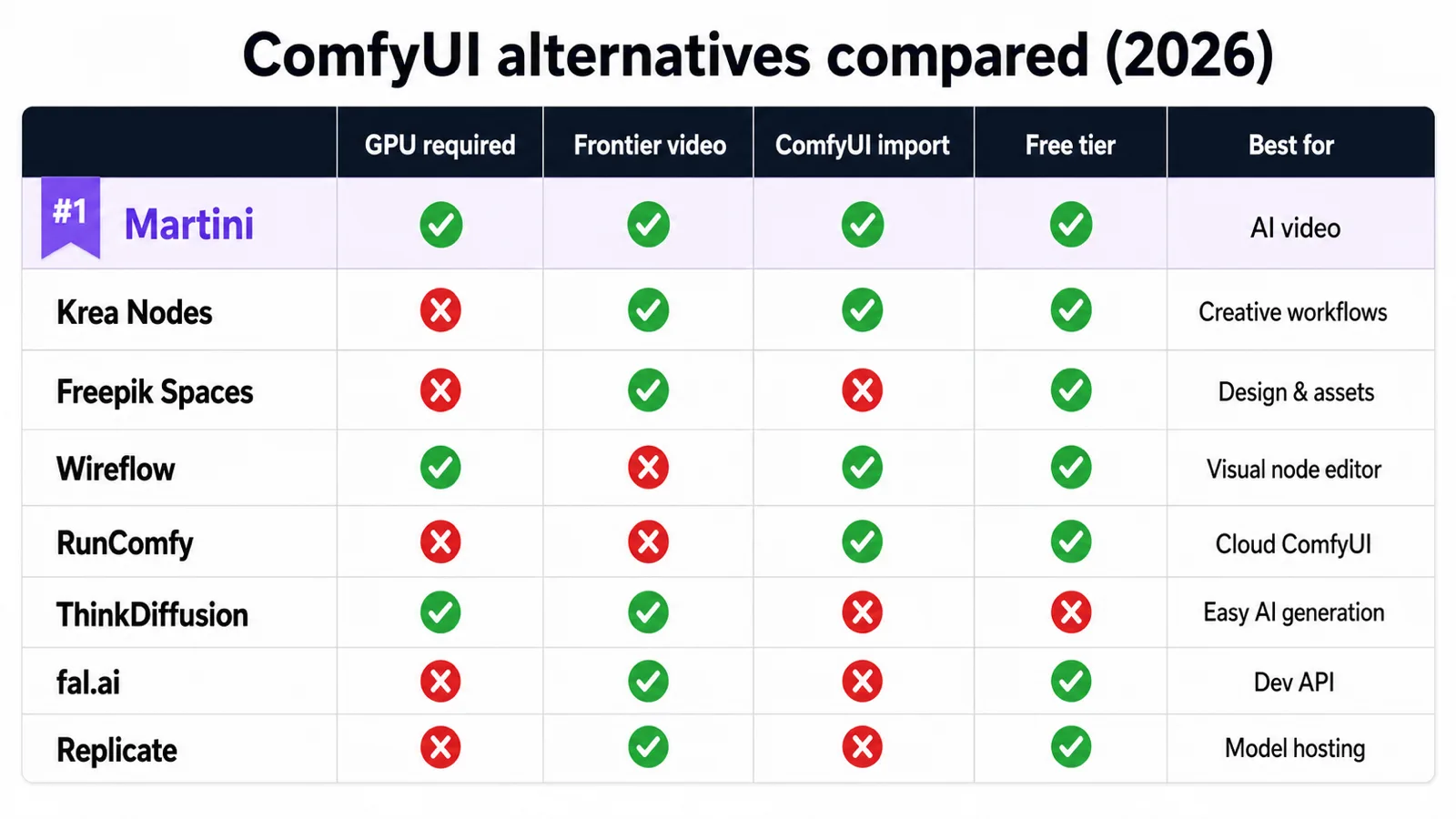
The best ComfyUI alternative without a GPU is a browser-based node canvas that runs models on remote compute, so you skip Python, CUDA, and a $400–$1,500 graphics card. For AI video and multi-modal workflows, Martini is the strongest pick — it fans one prompt across 50+ frontier image and video models (Sora 2, Kling 3.0, Veo 3.1, Runway Gen-4, FLUX) on an infinite canvas. For cloud-hosted ComfyUI itself with your own custom nodes and LoRAs, use RunComfy or ThinkDiffusion. For a free, open-source local replacement, InvokeAI and SwarmUI stay closest to ComfyUI. Be clear-eyed about the trade-off: ComfyUI is still unbeaten for free local control, custom samplers, and its 60,000+ community node ecosystem — its real cost is the GPU, the setup time, and the maintenance.
See them side by side


When to choose Martini
- You want node-based AI workflows without a local Python install, a CUDA GPU, or dependency troubleshooting — Martini, our #1 pick, runs entirely in the browser on any laptop, tablet, or Chromebook.
- Your workflow is video-heavy — Martini fans one prompt across Sora 2, Runway Gen-4, Kling 3.0, Veo 3.1, Hailuo, Ray 2, Vidu, Seedance, and Wan at once, where ComfyUI is image-only without bolt-on custom nodes.
- You need image, video, audio, lip-sync, 3D, and script writing on one canvas instead of assembling checkpoints, LoRAs, and separate tools around a Stable Diffusion graph yourself.
- You want to compare many takes fast — fan-out runs the same prompt across multiple frontier models simultaneously and keeps every result in a version tray, so you pick the winner instead of re-wiring a graph per model.
- You build reusable workflows a creative team can remix — product references, characters, prompts, generated assets, and downstream video or audio steps stay in one shareable project.
- You want NLE export — approved clips, audio, and edit notes move toward Adobe Premiere Pro and DaVinci Resolve via XML/EDL instead of losing context between tools.
When to choose ComfyUI
- You need low-level open-source Stable Diffusion control — custom samplers, schedulers, and raw latent manipulation that a curated cloud canvas deliberately does not expose.
- You rely on the community custom-node ecosystem — 60,000+ plugins extend ComfyUI in ways a managed platform cannot match.
- You want a free, open-source (GPL-3.0) tool and are comfortable maintaining it across updates; ComfyUI, InvokeAI, and SwarmUI all cost $0 in software.
- You want offline, fully local workflows on hardware you already own, with no per-credit billing — only electricity.
- You already run an NVIDIA GPU with 8 GB+ VRAM and a technical setup, and value maximum customization over convenience.
Side-by-side comparison
| Attribute | Martini | ComfyUI |
|---|---|---|
| Interface | Browser-based infinite node canvas — fan-out one prompt across many models. | Local node graph (Python desktop app); cloud only via hosts like RunComfy. |
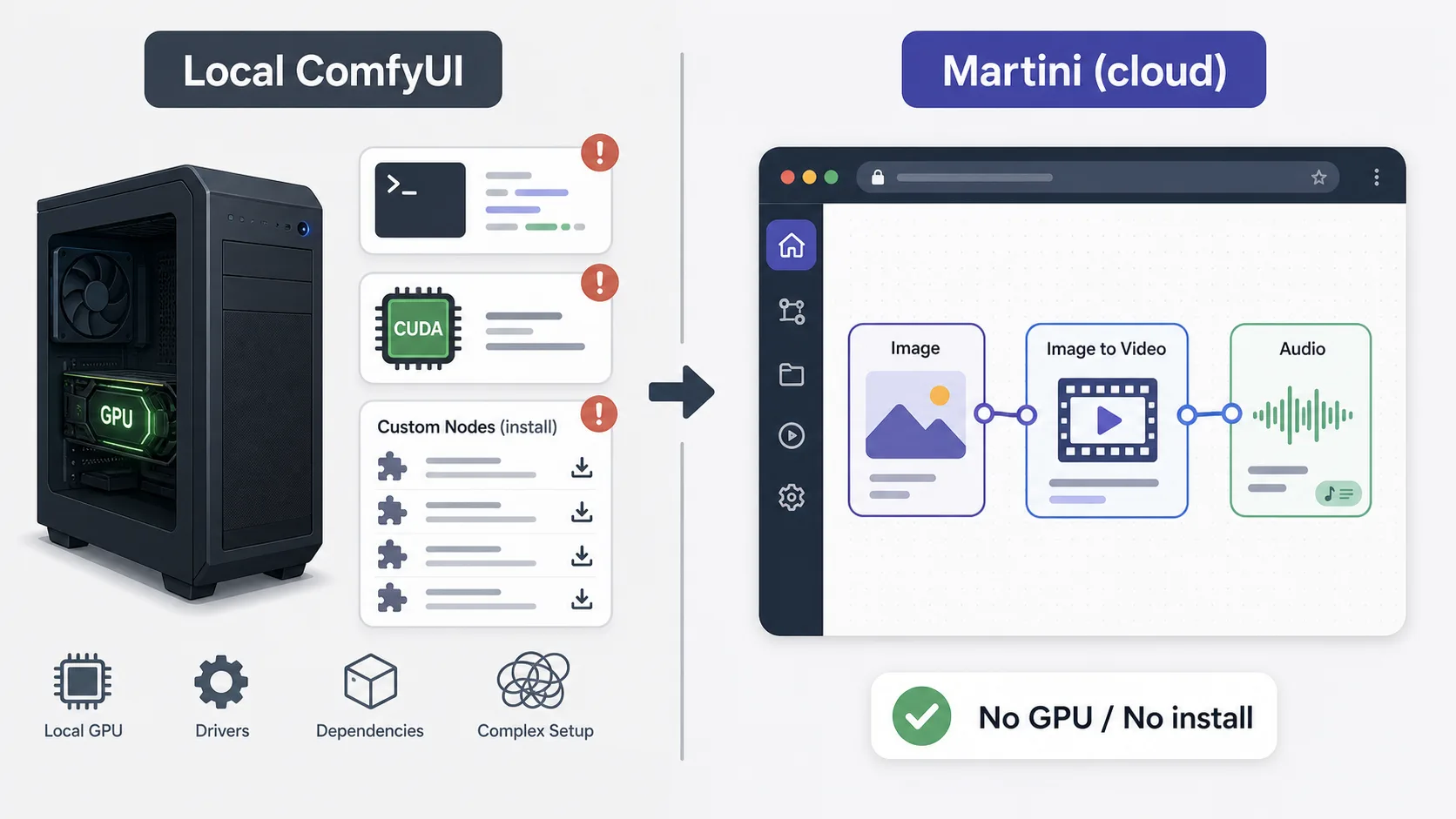
| GPU required | No — generation runs in the cloud, any device works. | Yes locally — NVIDIA, 8 GB+ VRAM; or rent cloud GPU time. |
| Setup time | Under 2 minutes — sign up and start building. | 30+ minutes with Python, CUDA, and dependencies, plus ongoing custom-node maintenance. |
| Supported media | Image, video, audio, music, 3D, and text on one canvas. | Image generation (Stable Diffusion / Flux); other media need custom-node packs. |
| AI models | 50+ frontier models across providers — Midjourney, FLUX, Imagen 4, Sora 2, Runway, Kling, Veo, Suno, ElevenLabs, Tripo3D, Claude, GPT. | Stable Diffusion / Flux family plus community checkpoints and LoRAs you supply. |
| Frontier video models | Yes — Sora 2, Runway Gen-4, Kling 3.0, Veo 3.1, Hailuo 02, Ray 2, Vidu, Wan 2.6. | No native frontier video (Sora/Kling/Veo) — image only, or open video custom nodes (Wan/AnimateDiff). |
| Multi-model fan-out | Yes — wire one prompt into many image and video nodes and run them simultaneously. | No — one graph runs one model path per execution; comparing models means re-wiring. |
| Audio and lip-sync | Built in — Suno music, ElevenLabs/Minimax TTS, sound effects, lip-sync (Kling, InfiniteTalk). | None natively; requires external tools. |
| ComfyUI-compatible / workflow import | No — Martini uses its own curated nodes, not ComfyUI JSON graphs. | Native — ComfyUI JSON workflows, custom nodes, ControlNet, IP-Adapter, LoRAs. |
| API access | Workflow runs are credit-based on the canvas; programmatic API on the roadmap, not a dev SDK today. | ComfyUI has an HTTP/queue API; RunComfy/fal.ai/Replicate expose hosted endpoints. |
| Free tier | Yes — 200 credits/month, no card, all models unlocked. | ComfyUI software is free (you supply the GPU); hosted RunComfy/ThinkDiffusion bill by GPU time. |
| Open source | No — managed cloud platform. | Yes — GPL-3.0 (as are InvokeAI and SwarmUI). |
| NLE export | Direct XML/EDL export to Adobe Premiere Pro and DaVinci Resolve. | Export frames/clips; assemble in an editor manually. |
| Collaboration | Project sharing, workspace billing, per-member credit limits. | Single-user local setup. |
| Cost | Free (200 credits/mo); paid plans from $20/mo flat. | Free software plus $400–$1,500+ GPU and electricity (or hosted GPU-time fees). |
Workflow comparison
| Step | Martini | ComfyUI |
|---|---|---|
| Get a node-based workflow running | Open martini.art, sign up, and start building on the infinite canvas in under 2 minutes — no install. | Install Python, set up a CUDA-compatible GPU, clone ComfyUI, resolve dependencies, and add custom nodes (30+ minutes). |
| Generate a concept image | Drop an Image Node, type a prompt, pick a model (Nano Banana on the free tier, or Midjourney/FLUX), and hit Generate. | Wire a Stable Diffusion checkpoint, sampler, and VAE nodes; render locally — quality and speed bound by your GPU. |
| Compare four models on the same prompt | Fan the prompt out into four Image or Video Nodes and run them at once; every take lands in a version tray to pick from. | Swap the checkpoint and re-run the graph four times, or duplicate and re-wire the graph per model. |
| Animate the still into video | Connect the Image Node to a Video Node — the image feeds Sora, Runway, Kling, Veo, or Seedance automatically. | Not supported natively; install a video custom-node pack (Wan/AnimateDiff) or switch to a separate tool and rebuild the chain. |
| Add voiceover, music, and lip-sync | Chain an ElevenLabs or Suno node, then a lip-sync node onto a presenter clip — all on the same canvas. | Requires external audio and lip-sync tools outside the ComfyUI graph. |
| Keep a character consistent across shots | Pin one reference image in the Elements library; reuse it across image, video, talking-head, and storyboard steps via @mentions. | Manage ControlNet, IP-Adapter, or LoRA nodes per generation, tuned by hand. |
| Hand off to an editor | Export approved clips, audio, and edit notes directly to Adobe Premiere Pro or DaVinci Resolve. | Export image frames; assemble video and audio manually in separate software. |
Pricing compared
| Plan | Martini | ComfyUI |
|---|---|---|
| Free | Free · 200 credits/month renewable · all 50+ models · fan-out · no card | ComfyUI free (GPL-3.0) · you supply the GPU; hosted free trials limited |
| Entry paid | Standard · $20/month flat · 1,600 credits | Hosted ComfyUI (RunComfy/ThinkDiffusion) from a few $/active GPU hour (2026) |
| Pro | Pro · $50/month flat · 5,400 credits | Self-hosted: $400–$1,500+ GPU + electricity, or scaling GPU-time fees |
| Top | Ultimate · $150/month flat · 17,000 credits | Self-hosted — no managed top tier; dev APIs (fal.ai/Replicate) bill per inference |
| Top-ups | $1 per 100 credits · 90-day expiry | Not applicable (hardware/GPU-time/per-call instead) |
Pricing and operational tradeoffs
- Martini (#1 pick): free tier with 200 credits per month and no card required — the full canvas, fan-out, and all 50+ models are unlocked on the free tier.
- Martini paid plans are flat by usage: Standard $20/month for 1,600 credits, Pro $50/month for 5,400 credits, Ultimate $150/month for 17,000 credits, plus $1 per 100 credits in top-ups (90-day expiry).
- Cloud-hosted ComfyUI (RunComfy, ThinkDiffusion): your own ComfyUI graphs and custom nodes on a rented GPU, billed by GPU time or an hourly/credit plan — typically a few dollars per active hour as of 2026. Best when you must keep existing ComfyUI workflows.
- Developer endpoints (fal.ai, Replicate): pay-per-inference APIs for FLUX, SDXL, video, and audio models — priced per generation, no canvas UI. Best for engineers wiring models into their own product, not visual workflow building.
- ComfyUI itself is free, open-source software — the real cost is hardware: a capable NVIDIA GPU (8 GB+ VRAM) typically runs $400–$1,500+ as of 2026, plus electricity and your setup time. InvokeAI and SwarmUI are likewise free and open-source.
- Break-even math: at $20/month, Martini costs about $240/year — roughly the price of a single mid-range used GPU, with zero electricity, driver, or maintenance overhead and 50+ frontier models you would otherwise assemble yourself.
Which to choose by use case
1. Martini — best overall ComfyUI alternative and best for AI video
Recommendation: Martini
Browser-based node canvas, no Python or CUDA, fan-out across 50+ frontier image and video models, plus audio, lip-sync, storyboard, and NLE export. Trade-off: not open source and no ComfyUI workflow import. Free tier; paid from $20/mo (2026).
2. Krea Nodes — best lightweight visual node canvas
Recommendation: Krea Nodes
A friendly browser node editor for image generation and remixing with a low learning curve. Trade-off: narrower video and team-production depth than Martini. Paid plans as of 2026.
3. Freepik Spaces (Magnific) — best for upscaling and stock-adjacent image work
Recommendation: Freepik Spaces
Node-style canvas tied to Freepik/Magnific upscaling and a large asset library. Trade-off: design-tool focus, less frontier-video coverage. Subscription-based (2026).
4. Wireflow — best open node-canvas for chaining image and video steps
Recommendation: Wireflow
A web node canvas built around chaining generation steps with a live embed. Trade-off: smaller model roster and ecosystem than Martini. Free and paid tiers (2026).
5. RunComfy — best cloud-hosted ComfyUI (keep your exact graphs)
Recommendation: RunComfy
Runs real ComfyUI in the cloud, so your JSON workflows, custom nodes, and LoRAs work unchanged on a rented GPU. Trade-off: still ComfyUI complexity, billed by GPU time. Hourly/credit pricing (2026).
6. ThinkDiffusion — best managed ComfyUI/A1111 for teams
Recommendation: ThinkDiffusion
Hosted ComfyUI and Automatic1111 machines with no local setup. Trade-off: GPU-time pricing and the same node-graph learning curve as ComfyUI. Per-hour plans (2026).
7. fal.ai — best developer API for inference at scale
Recommendation: fal.ai
Fast pay-per-inference endpoints for FLUX, SDXL, video, and audio models. Trade-off: an API, not a visual canvas — for engineers, not visual workflow builders. Per-generation pricing (2026).
8. Replicate — best model marketplace for prototyping
Recommendation: Replicate
Run thousands of community and frontier models via a simple API and web UI. Trade-off: no node canvas; you script the pipeline yourself. Per-second/per-run pricing (2026).
Related Martini workflows
ai-canvas-workflow
/features/ai-canvas-workflow
ai-video-workflow
/features/ai-video-workflow
ai-image-to-video
/features/ai-image-to-video
ai-lip-sync
/features/ai-lip-sync
ai-storyboard-generator
/features/ai-storyboard-generator
ai-video-nle-export
/features/ai-video-nle-export
ai-character-consistency
/features/ai-character-consistency
Related models
Related how-to guides
animate-images
/en/how-to/animate-images
create-multi-shot-video
/en/how-to/create-multi-shot-video
generate-consistent-character
/en/how-to/generate-consistent-character
create-video-with-reference-character
/en/how-to/create-video-with-reference-character
create-ai-short-film
/en/how-to/create-ai-short-film
upscale-images-to-4k
/en/how-to/upscale-images-to-4k
Related workflows
Compare with other tools
Related reading
Frequently asked questions
- What is the best ComfyUI alternative without a GPU?
- The best ComfyUI alternative without a GPU is a browser-based node canvas that runs models on remote compute. Martini is the strongest pick for AI video and multi-modal work because it fans one prompt across 50+ frontier image and video models on an infinite canvas with no Python, CUDA, or graphics card — it runs from a laptop, tablet, or Chromebook.
- Is there a browser-based version of ComfyUI?
- Yes. Cloud hosts like RunComfy and ThinkDiffusion run the real ComfyUI in your browser on a rented GPU, so your existing JSON workflows and custom nodes work unchanged. If you want a node canvas without ComfyUI complexity, Martini, Krea Nodes, Wireflow, and Freepik Spaces are native browser node editors built for the same visual workflow idea.
- Can I run ComfyUI workflows in the cloud?
- Yes. RunComfy and ThinkDiffusion host ComfyUI itself in the cloud, so your ComfyUI JSON graphs, custom nodes, ControlNet, and LoRAs run on a remote GPU billed by GPU time. This is the closest option when you must keep your exact existing ComfyUI workflows rather than rebuild them in another tool.
- Are there free ComfyUI alternatives?
- Yes. The free, open-source alternatives closest to ComfyUI are InvokeAI and SwarmUI (both GPL/Apache-style and free to run on your own GPU). For a free cloud option, Martini has a free tier with 200 credits per month, no card required, and unlocks all 50+ models plus fan-out — the trade-off is that it is a managed platform, not open source.
- What is the easiest ComfyUI alternative for beginners?
- For beginners, Martini is the easiest because it removes setup entirely — sign up, drop a node, type a prompt, and generate in under two minutes with no Python, CUDA, or dependency errors. Krea Nodes is another low-learning-curve browser canvas. Hosted ComfyUI like RunComfy still carries ComfyUI’s steeper node-graph learning curve.
- Which ComfyUI alternative supports video generation?
- Martini is the strongest ComfyUI alternative for video: it natively runs frontier video models — Sora 2, Runway Gen-4, Kling 3.0, Veo 3.1, Hailuo, Ray 2, Vidu, Seedance, and Wan — and can fan one prompt across several at once. ComfyUI itself has no native frontier video and reaches it only through open video custom nodes like Wan or AnimateDiff.
- Can I import my ComfyUI JSON workflows into another tool?
- Only cloud-hosted ComfyUI (RunComfy, ThinkDiffusion) imports ComfyUI JSON workflows directly, because they run the actual ComfyUI engine. Native canvases like Martini, Krea Nodes, and Wireflow use their own node systems, so you rebuild the workflow there — the node mental model carries over, but the JSON does not.
- Do ComfyUI alternatives support custom models, Flux, SDXL, and LoRAs?
- It depends on the type. Hosted ComfyUI (RunComfy, ThinkDiffusion) and open-source InvokeAI/SwarmUI support custom checkpoints, FLUX, SDXL, and your own LoRAs because they run open weights locally. Curated cloud canvases like Martini call FLUX and Stable-Diffusion-family models plus 50+ frontier models, but do not let you upload arbitrary custom LoRAs — that depth stays with ComfyUI.
- Is a cloud canvas cheaper than buying a GPU?
- Often, yes. A capable NVIDIA GPU for local ComfyUI runs $400–$1,500+ as of 2026 plus electricity and maintenance, while Martini’s Standard plan is $20/month — about $240/year — for 1,600 credits and 50+ frontier models. If you already own a workstation GPU and technical staff, local ComfyUI can be cheaper long-term; if you do not, a cloud canvas usually wins on total cost.
Try Martini for your next project
Open Martini and wire up your workflow on the canvas. Free to start — no card required.