Runway
Runway Aleph
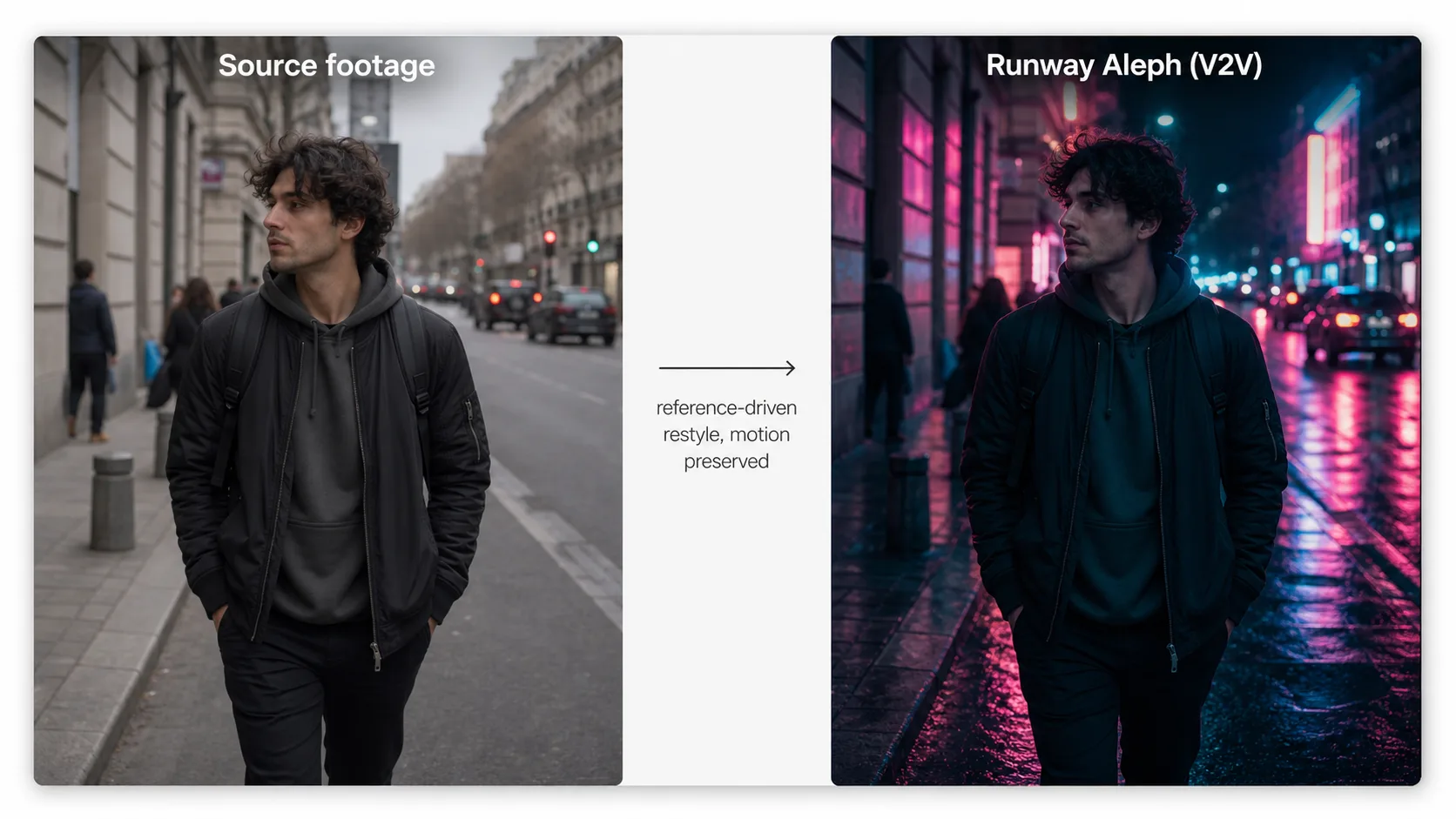
Runway Aleph is an in-context, video-to-video (V2V) AI model from Runway, first introduced in mid-2025, that edits and transforms existing footage instead of generating clips from scratch. On Martini, Runway Aleph reskins a source video with reference images while faithfully preserving its original motion, timing, and camera work — and you can fan the same clip across Runway Aleph, Gen-4 Turbo, Sora 2, and Kling on one canvas to compare takes.
Runway Aleph is an in-context AI video model that edits and transforms existing footage rather than generating new clips. It operates in video-to-video (V2V) mode: you supply an existing video clip plus one or more reference images that define the desired visual style or character appearance, and Runway Aleph re-renders the footage with the new look while faithfully following the original motion path, camera movement, and timing. As of 2026 this in-context approach makes Runway Aleph well suited to style transfer, object and character replacement, relighting, environment changes, and VFX work where the underlying choreography must stay intact. It is not a general-purpose generator — Runway Aleph does not do text-to-video or image-to-video from scratch, so you start from real or pre-rendered footage. On Martini, Runway Aleph runs as one node among 50+ image and video models: fan a single source clip into Runway Aleph alongside Gen-4 Turbo (image-to-video), Sora 2 (storyboard physics), Kling, and Seedance, keep every take in the version tray, and export the winning edit straight to your NLE timeline. Searchers also look for a "Runway Aleph 2" — Runway iterates its model line quickly, so treat any "Aleph 2" as a future revision of the same in-context editing family; the V2V, motion-preserving editing role described here is what the Aleph family is built for.
Capabilities
Supported Aspect Ratios
Best For
- Visual style transfer on existing footage
- Object and character replacement while preserving choreography
- Relighting and environment changes on shot footage
- Brand reskinning of template and stock videos
- VFX pre-visualization with reference-driven looks
Strengths
- Faithfully preserves original motion, timing, and camera work
- Reference images give precise control over the output aesthetic
- In-context editing means you iterate on a real shot without re-shooting
- Clean temporal consistency across frames
Limitations
- Video-to-video only; cannot generate video from text or a single image
- Requires existing source footage as input
- Extreme style changes may cause some motion drift
Tips & Best Practices
Use Runway Aleph on Martini
Connect Runway Aleph with other AI models on Martini's infinite canvas. No GPU required — start free.
Get Started FreeFrequently Asked Questions
What is Runway Aleph?
Runway Aleph is an in-context, video-to-video AI model from Runway that edits and transforms existing footage instead of generating new clips. You give it a source video plus reference images, and it re-renders the shot with a new style, object, or environment while preserving the original motion, timing, and camera path. On Martini it runs as one node on the canvas alongside 50+ other image and video models.
What can Runway Aleph do?
Runway Aleph performs in-context video editing: style transfer, object and character replacement, relighting, environment changes, and reference-driven VFX looks on footage you already have. Because it works in V2V mode it keeps the original choreography intact, so the motion and camera move stay the same while only the look changes — ideal for iterating on a shot without re-filming it.
What is the difference between Runway Aleph and Gen-4?
Runway Aleph is a video-to-video editor that transforms existing footage, while Runway Gen-4 (including Gen-4 Turbo) is a generator that creates new clips from a prompt or a source image (image-to-video). Use Gen-4 Turbo when you have a still and need motion from scratch; use Runway Aleph when you already have a video and want to restyle, relight, or replace elements while keeping its exact motion. On Martini you can run both on the same canvas and compare.
Is there a Runway Aleph 2?
As of 2026, "Runway Aleph 2" mostly appears as a search query for a next revision of the Aleph line; Runway iterates its models quickly, so treat any Aleph 2 as a future version of the same in-context, motion-preserving V2V editing family. Whichever revision is current, Martini surfaces the latest Runway Aleph as a single node so you always run the up-to-date model without changing your workflow.
Does Runway Aleph support text-to-video or image-to-video?
No. Runway Aleph is video-to-video only — it requires existing source footage as input and does not generate video from a text prompt or a single still. For text-to-video or image-to-video on Martini, use models such as Sora 2 or Runway Gen-4 Turbo, then bring the result into Runway Aleph if you want to restyle or edit it in-context.
How do I compare Runway Aleph against other AI video models on the same prompt?
On Martini you fan one source clip into multiple model nodes at once — wire it into Runway Aleph, Gen-4 Turbo, Sora 2, Kling, and Seedance simultaneously, run them together, and keep every result in the version tray. You judge the edited and generated takes side by side on one canvas, then export the winner to your NLE timeline. No competitor publishes first-party same-source comparisons because fan-out is the product.
Can I use Runway Aleph without a GPU or local install?
Yes. Runway Aleph runs entirely in the browser on Martini's AI creative canvas — no GPU, no local install, and no ComfyUI graph to maintain. You upload your source footage and reference images, run the edit as a node, and the cloud handles the compute. Credits are shared across personal and workspace billing.
How much does Runway Aleph cost on Martini?
Runway Aleph runs on Martini's dual-balance credit system: each generation deducts credits from your monthly subscription quota first, then from purchased wallet top-ups. The exact credit cost depends on clip length and settings and is shown before you run the node, and the same credits work across all 50+ models so you are not locked into one provider's plan.