Tencent
HunyuanVideo-Foley
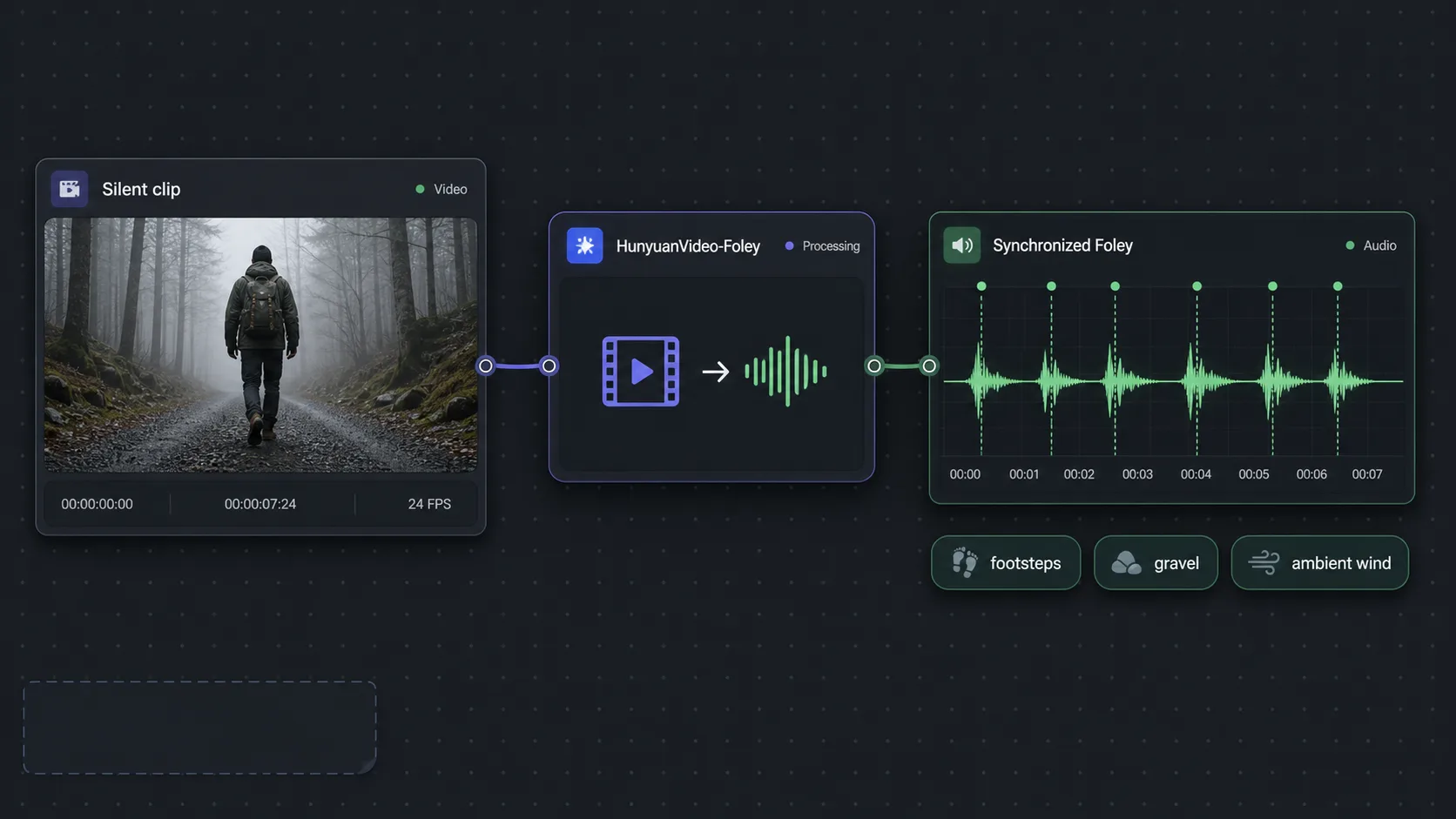
HunyuanVideo-Foley (also written Hunyuan Foley or Hunyuan Video Foley) is Tencent's video-to-audio Foley model that watches a silent clip and generates synchronized sound effects — footsteps, impacts, door slams, ambience — timed to the on-screen action. It does not generate video; it adds the missing soundtrack to footage from any source. On Martini you run Hunyuan Foley as one node on an infinite canvas, alongside 50+ image, video, and audio models, then mix and export to your timeline.
HunyuanVideo-Foley fills the single biggest gap in AI video production: silent clips. Most text-to-video and image-to-video models — Sora 2, Kling, Seedance, Veo — output beautiful footage with no sound, leaving you to hand-design every footstep and ambience in a separate NLE. Hunyuan Video Foley closes that gap automatically. Feed it any video and the model analyzes the visual content frame by frame, recognizes sound-producing events, and renders a matching audio track where each effect lands precisely on the action that causes it. Because it understands temporal alignment, a foot hitting gravel, a glass setting down, or rain on a window all sound on the right frame rather than drifting out of sync. As of 2026, Tencent's research positions HunyuanVideo-Foley as a Text-Video-to-Audio system trained for high-fidelity, professional-grade Foley with strong audio-visual synchronization across a wide range of scenes. On Martini, that makes it the natural last step in a pipeline: generate or upload your video, wire it into the Hunyuan Foley node, and get a complete audiovisual asset without recording a single sound. Unlike a prompt-driven sound-effects generator such as ElevenLabs Sound Effects v2, which builds audio from a text description, Hunyuan Foley derives the sound directly from the picture — so it captures motion and timing you would otherwise have to describe by hand. You can fan the same silent clip into Hunyuan Foley and a music or ambience model simultaneously, keep every take in the version tray, and pick the mix that fits the cut.
Capabilities
Supported Aspect Ratios
Best For
- Adding synchronized sound to AI-generated silent video clips
- Post-production Foley for short-form and social video
- Rapid audio prototyping before a full sound-design pass
- Completing audiovisual assets without manual Foley recording
Strengths
- Precise temporal alignment of audio to on-screen events
- Derives sound from the picture, not just a text prompt
- Understands a wide range of sound categories (footsteps, impacts, ambience)
- Eliminates manual Foley recording and sound-library searching
- Works with video from any source or generation model
Limitations
- Does not generate video; audio-only output for existing footage
- Complex soundscapes with many overlapping events may lose precision
- Generated audio is a mixed track, not individually editable stems
- Best results need clear, visible sound-producing motion in the clip
Tips & Best Practices
Use HunyuanVideo-Foley on Martini
Connect HunyuanVideo-Foley with other AI models on Martini's infinite canvas. No GPU required — start free.
Get Started FreeFrequently Asked Questions
What is HunyuanVideo-Foley used for?
HunyuanVideo-Foley is used to add synchronized sound effects and Foley — footsteps, impacts, door slams, ambience — to silent video. You feed it an existing clip and it generates a matching audio track timed to the on-screen action, so AI-generated or uploaded footage stops sounding like a silent draft. It does not create video; it creates the soundtrack for video you already have.
What is Foley, and what are AI sound effects from video?
Foley is the craft of recording everyday sound effects — footsteps, cloth movement, object handling — in sync with picture, traditionally performed by hand in a studio. AI sound effects from video automate that step: a video-to-audio model like Hunyuan Foley watches the footage, recognizes what is happening, and renders the corresponding sounds aligned to each frame, replacing manual recording and sound-library searching.
Does Hunyuan Foley generate video?
No. Hunyuan Foley is audio-only. It is a video-to-audio model that analyzes an existing clip and outputs a synchronized sound track, not new frames. To create the picture first, pair it with a text-to-video or image-to-video model such as Sora 2, Kling, Seedance, or Veo on Martini, then route the silent result into the Hunyuan Foley node for sound.
Who made HunyuanVideo-Foley?
HunyuanVideo-Foley was developed by Tencent as part of its Hunyuan family of generative models. It is a Text-Video-to-Audio system focused on high-fidelity, professional-grade Foley with strong audio-visual synchronization. On Martini you access it as a standard node without managing any local setup or GPU.
How is Hunyuan Foley different from a sound-effects generator like ElevenLabs?
A prompt-driven generator such as ElevenLabs Sound Effects v2 builds audio from a text description you write, while HunyuanVideo-Foley derives the sound directly from the video itself — so it captures motion, timing, and the order of events automatically. As of 2026, the practical workflow is to use Hunyuan Foley for picture-synced Foley and a prompt-based generator for specific designed effects, then mix both on the canvas.
How do I add Hunyuan Foley audio to AI video on Martini?
On Martini you wire your video node into the HunyuanVideo-Foley node, generate, and the synchronized audio appears as a take in the version tray. Because Martini is a browser-based node canvas with no install or GPU, you can fan the same silent clip into Foley plus a music or ambience model at once, compare mixes, and export the finished audiovisual clip to your NLE timeline.
What kinds of sounds can HunyuanVideo-Foley generate?
HunyuanVideo-Foley generates a broad range of diegetic sounds tied to visible action — footsteps on different surfaces, impacts and object handling, mechanical and door sounds, and environmental ambience like rain or wind. It works best when the clip contains clear, visible sound-producing motion; very dense scenes with many overlapping events can lose some precision.